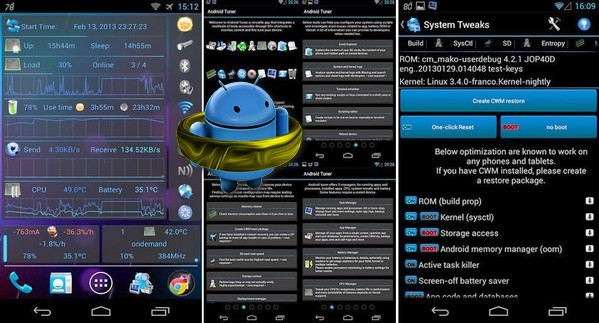
3C Toolbox combines many features from larger apps into a single toolbox with a modern, user-friendly interface. 3C Toolbox has all the tools you need to monitor, control, and fine-tune all your Android devices. Save €25 or €30 by getting 3C Toolbox instead of multiple separate apps.
Works best on rooted phones, works well on stock systems too
Here are some of the features you will find in the application:
– Special support for dual-battery devices, LG Quick Circle and Samsung Edge notifications
– Toolbox integration enables battery saving and performance optimization, profiles to control CPU, I/O and peripherals, and application state management from anywhere
– The highly configurable interface allows you to transform the application as you wish
– device Manager It offers the most powerful profiles, task scheduling, and monitoring features you can find to optimize performance and save battery life based on your unique situation.
– File Explorer * is a very simple yet powerful file explorer that can use root privileges, sort by date, size, and stream media files, as well as update permissions, ownership, and security context. It can be used locally or from any Samba network share.
– Application Manager * provides all the features you would expect from these and much more to secure, optimize and fine-tune all the applications on your device as you wish.
– Battery manager * will help you identify the apps that drain your battery and improve your profiles using comparison statistics, as well as keep track of what actually happened over a very long period of time
– Network manager Allows you to define the priority of the WiFi access point and its configuration * Android firewall, TCP congestion and DNS
– Task Manager It offers a simple yet highly effective user interface for sorting applications by various uses and getting rid of unwanted applications.
– CPU Manager * Unique control over octa-core processors, multi-core thermal management, and most custom kernel parameters
– System Manager * Configure your device to the lowest level, starting with high-performance SD cards, memory boosting, and fine-tuning various hidden parameters using build.prop and sysctl editors.
– Monitoring and recording All application activity and battery consumption, component status (connections, location, and phone). Also allows adding status bar notifications with graphics and removing the default battery icon using the Xposed framework.
– Highly configurable widgets They are all resizable, from a simple gauge to a more complex data display, allowing you to switch between components, and historical graphs
– Component switches The system, within the application, in widgets, or using profiles, allows switching approximately 20 device components (WiFi, Bluetooth, etc.) on/off, either manually or automatically.
The Pro version allows you to:
– Hide tabs or any menu items
– Modify the main buttons on the 4x6 grid screen
– Multi/auto-select, sorts apps in the application manager and (root) explorer
– Automatic backup of updated applications and new application notifications
– Registering the elements and options
– Use the force-stop function in the task manager and mission-killer.
– Create multiple calendars, observers, and profiles
– Automatic battery markers and management of multiple batteries
– Notification shortcut to access all status notification features
– Additional widgets: 2x1 text, 2x1-5x2 graphics, 4x1-1x4 toggle, and 4x4 summaries
– No ads
- Version : Complete
– Compatibility: Android 2.3 or higher
- Language : Multilingual
- Size : 10.9 MB
This article was updated on November 10, 2016