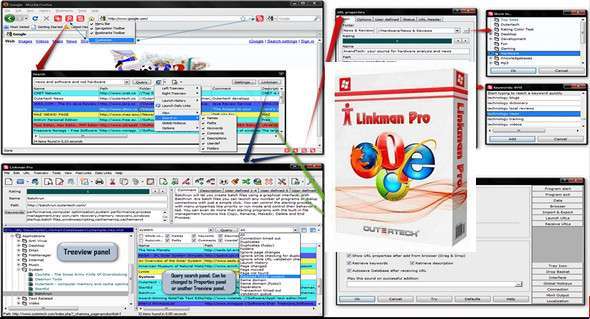
Integrating with the latest versions of Google Chrome, Firefox, Internet Explorer, and Opera, Linkman empowers you to efficiently organize your bookmarks and favorites! Linkman is a standalone, browser-independent bookmark organizer, search tool, and broken link checker. Add links from your browser, and Linkman will automatically retrieve keywords and descriptions! Linkman can not only organize your bookmarks but also help you detect and eliminate duplicate and broken links from your bookmark collection. You can choose to organize your bookmarks by keywords only, folders only, or both folders and keywords.
Favorites Organizer
Linkman is a bookmark organizer that provides seamless access to bookmarks and favorites across browsers and even multiple computers (Pro version). If you add a bookmark in Internet Explorer, you can also access the new bookmark in Firefox, Google Chrome, Opera, and vice versa (Lite and Pro versions). You can also import your existing bookmarks into Linkman from any browser. Linkman is the only bookmark organizer that properly manages IE Favorites and imports Firefox bookmarks, including tags and keywords! Linkman supports up to 10 different import formats, and you can even scan any file for bookmarks.
Internet Explorer Favorites Organizer
Linkman offers an optional Internet Explorer Organizer toolbar for quick access to your bookmarks and favorites. You can import your IE favorites into Linkman (recommended) or simply load them. The Internet Explorer Favorites toolbar lets you quickly add new bookmarks and search your Linkman database. The two buttons on the toolbar can be assigned to individual Linkman functions. You can also drag and drop links from web pages to the toolbar to add them to Linkman. In the search field, you can use wildcards and operators to combine search terms. AND (default), OR, AND NOT, and the hyphen '-' can be used. For example, a search for "network tweak -adsl" will find all links containing the keyword "network" AND the keyword "tweak," but not containing the keyword "adsl."
Opera Favorites Organizer
An Organizer Book Organizer add-on is installed by default if Linkman detects Opera on the computer (this can be deselected). You need at least Opera version 11 for the add-on to work. You will get a new button on the Opera toolbar that will allow you to replace the very limited Opera bookmarks with Linkman's bookmark management functionality. Click the button to display a menu with Linkman functions, such as Search in Linkman. In the search window, Linkman uses wildcards and operators to combine search terms. AND (default), OR, AND NOT, and the hyphen '-' can be used. For example, a search for "cheap computer -apple" will find all links containing the keyword "cheap" AND the keyword "computer," but not containing the keyword "apple."
Firefox Favorites Organizer
Linkman integrates with the Mozilla Firefox browser to replace Firefox bookmarks. The LinkmanFox Firefox bookmark organizer is installed by default if Linkman detects Firefox on your computer (this can be disabled during installation). After installation, you can place buttons with Linkman functionality (such as Add Bookmark or Search Bookmarks) in the Firefox toolbar. Linkman functionality is also accessible in the Firefox context menu and via mini-icons in the Addons toolbar.
Google Chrome Favorites Organizer
A Google Chrome Bookmarks Organizer add-on is installed by default if Linkman detects Chrome on the computer (this can be deselected). You will get a new button in the Chrome toolbar that will allow you to replace the very limited Chrome bookmarks with Linkman's bookmark management features. Click the button to display a menu with Linkman functions, such as Search in Linkman. In the search window, you can use wildcards and operators to combine search terms. AND (DEFAULT), OR, AND NOT, and the hyphen '-' can be used. For example, a search for bookmarks sync -favorites will find all links containing the keywords bookmarks AND sync, and at the same time NOT containing the keyword favorites.
Optional desktop toolbar
The optional Linkman Desktop Toolbar is one of Linkman's most powerful features. It allows you to store, edit, search, and launch bookmarks quickly and efficiently. The toolbar offers numerous search and launch options. You can add new bookmarks using the menu, buttons, or by dragging and dropping them directly from web pages to the toolbar. The toolbar's size can be changed by clicking and holding the mouse cursor on the top edge. You can also quickly collapse and expand the toolbar using a button. To activate the toolbar, go to the View menu in the Linkman main window.
Configuration:
– Windows (x32/x64 Bits): XP, Vista, 7, 8, 8.1, 10
– Processor: 1 GHz
– RAM: 512 MB
– Disk space: 20 MB
Language Multilingual (including French)
Size : 9.2 MB
This article was updated on October 27, 2017