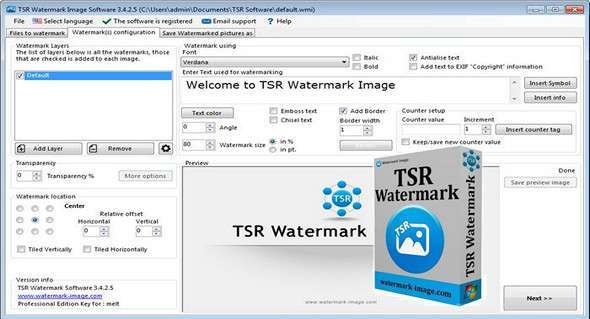
TSR Watermark software is a simple way to obtain watermarked photos; its ease of use is quick to learn even for a non-technical person.
You can create various watermarks to protect your photos; these can take the form of text or a logo. You can modify the color, size, transparency, and borders, as well as change the angle of the applied watermark. If you want to add a watermark or copyright notice to a photo before uploading it online, TSR Watermark software is an excellent choice.
Features
– Add multiple watermarks to each image.
– Save each image in multiple output folders, this way you can easily generate thumbnails, etc. all at once.
– Add a text watermark that is either normal, embossed, chiseled or watermarked with a border.
– Automatically rotate the watermarked image according to the EXIF orientation label - this is written on the image by many modern cameras.
– Add the text used for the image watermark to the EXIF information in the resulting file.
– Keep or delete EXIF information in JPEG files (camera model / lens model / etc.)
– Output of the watermarked photo in JPEG, TIFF, PNG, BMP, GIF file format.
– Specify the quality of the watermark
output when saved as JPEG images
– Angle the text you use for your watermarked photo
– Insert a background watermark into digital images, images
– Resize images while watermarking the image/photo
– Watermark your photos using another image, photo or picture
– Watermark your photos using your own text in the color and style you want.
– Maintain the directory structure in the destination directory or combine all watermarked images in batches into one directory
– Ignore or replace existing watermarked images/photos in the destination directory
– Command line option to automatically load a profile and batch watermark all photos.
Configuration:
– Windows (x32/x64 Bits): XP, Vista, 7, 8, 8.1, 10
– Processor: 1 GHz
– RAM: 512 MB
– Disk space: 20 MB
Language Multilingual (including French)
Size : 13.0 MB
This article was updated on November 25, 2017