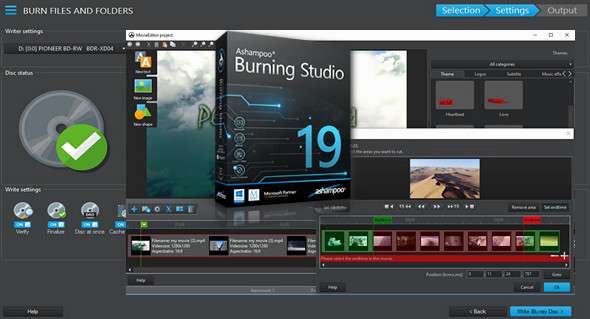
Ashampoo Burning Studio 19 burns your files, movies, and music to any CD, DVD, or Blu-ray disc. It's easy, fast, and secure! Burn data, create audio CDs, make backups, or produce your own movies—the possibilities are endless! Even advanced projects like video DVDs with animated menus and scene selection screens take only minutes. Get the complete solution for your disc recorder!
• Fast, clear and powerful – now with scratch protection!
• Burn movies and photos to a disc with animated menus
• History view for the last 20 projects with recovery functionality
• Enhanced backup features with encryption and password support
Disc burning can be that simple!
Many new users feel overwhelmed when using Burning Studio for the first time. Yes, it's all centered around three steps: select your files, select the processing method, and select the target. Need an animated menu for your video DVD? It only takes a few clicks. Want to back up your photo collection across multiple discs? With Ashampoo Burning Studio 19, anyone can do it!
Scratch-resistant protection for maximum safety
The new scratch protection perfectly safeguards your data. Scratches can render disk surfaces unreadable and files unrecoverable. Ashampoo Burning Studio 19 eliminates the fear of scratches by distributing multiple copies of your data across the disk with an emergency recovery tool! This way, you can always recover your precious files and memories if a disk is scratched.
Convenient history function
The new history feature shows you your 20 most recent projects and lets you retrieve them with a single click! All edits, design adjustments, and, of course, file selections will be restored. You'll never lose track of your projects again!
Versatile video editor
The easiest-to-use video editor on the market! Save time and combine images and videos in just a few clicks, add background music, and you're done. If you wish, put the finishing touches on your project and fine-tune display durations and transitions.
The right format for each film
Creating and burning movies is one of Ashampoo Burning Studio 19's main strengths. To ensure maximum compatibility with all available players, the program supports all common formats, from MPEG4 and H.264 to AAC. Whether you're making simple mobile phone recordings or undertaking ambitious film projects, Burning Studio 19 is the safest choice for you.
The burning software can be so intuitive!
The new Ashampoo Burning Studio 19 respects the natural workflow of its users. While other burning applications make you grind your way through countless modules, Burning Studio offers simple and quick solutions. Need great results fast with little to no manual setup? Ashampoo Burning Studio 19 is the program for you, with intelligent automatic functions and presets that take the work off your shoulders!
Create your own movies and slideshows
With Burning Studio 19, there are no limits to what you can do! Trim videos, add intros and outros, or insert subtitles or ready-made themes for professional results. Set the tone with custom graphics and sounds, create stunning slideshows with background music, and transform your precious memories into a visual masterpiece. Design individual covers for your audio CDs and use the captivating Mosaic feature or the many available templates. Whether it's a family celebration, a business event, or a holiday, Ashampoo Burning Studio 19 turns everything into a work of art!
Extracting CDs and burning music discs
Ashampoo Burning Studio 19's ingenious auto-rip function extracts audio from music discs in seconds! The artist and title are automatically recognized. Create high-quality CDs with perfect file sizes in the best formats. Use the equalization and volume normalization features for enhanced sound and complete the package with custom cover art.
Safe and secure multi-purpose engraving
Burning Studio takes an imaginative approach even to simple tasks like data burning. Disc splitting makes it incredibly easy to divide data across multiple discs, and it supports automatic reading with customizable menus and offers enhanced password protection for encrypted discs. New scratch protection ensures data readability, even on heavily damaged disc surfaces!
Reliable backups for important data
Burning Studio comes with powerful backup features. Burn or back up your data wherever you want. Simply select your files, choose a target, and you're good to go—surprisingly simple, yet technically brilliant. If your data doesn't fit on a single disc, Burning Studio will automatically split it across multiple discs. Compression and password protection are also supported!
Configuration:
– Windows (x32/x64 Bits): 7, 8, 8.1, 10
– Processor: 1 GHz
– RAM: 512 MB
– Disk space: 1 GB
Language Multilingual (including French)
Size : 139.9 MB
This article was updated on December 4, 2017