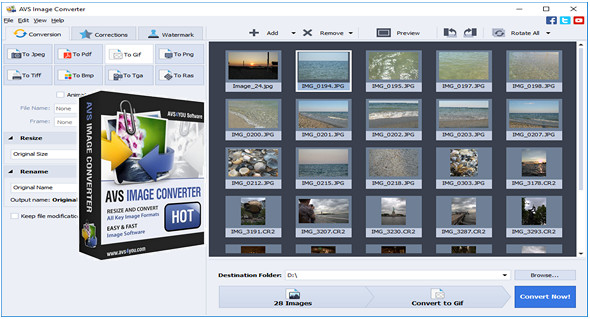
AVS Image Converter – convert images to any format in one click! Make quick adjustments – resize, rotate, apply auto-correction settings. Choose from a variety of effects. Get your photos ready to print or upload to websites!
Convert images between all formats such as:
– BMP – Windows Bitmap (.bmp)
– GIF – Graphics Interchange Format (.gif)
– JPEG – Joint Photographic Expert Group (.jpeg, .jpg, .jpe, .jfif)
– PNG – Portable Network Graphics (.png)
– APNG – Animated Portable Network Graphics (.apng)
– TIFF – Tagged Image File Format (.tiff, .tif)
– TGA – Targa Image File (.tga)
– RAS – SUN Raster Format (.ras)
– PDF – Portable Document Format (.pdf)
– PCX – Personal Computer Exchange (.pcx)
– PSD – Photoshop Document (.psd)
– EMF – Enhanced MetaFile (.emf)
– WMF – Windows MetaFile (.wmf)
– JPEG 2000 (.jp2, .j2k)
– RAW Image Format (.cr2, .crw, .raf, .dng, .mef, .nef, .orf, .arw)
– SVG – Scalable Vector Graphics (.svg)
– ITHMB – iPhone/iPod Thumbnail Files (.ithmb)
– SFM – Seattle FilmWorks (.sfm)
– WB1 – Webshots Graphic Files (.wb1, .wbz, .wbc)
– PDD – Adobe PhotoDeluxe Image (.pdd)
– SWF – SWF Image (.swf)
Apply effects
Get the aging effect on old photos, or give your photos a "classic" look and use the black and white effect, etc.
Select the image, resize the presets
Automatically resize your photos to the most common print formats with AVS Image Converter. Prepare your images for future slideshows that you can upload to popular websites.
Watermark your photos
Select a logo or write a phrase and apply it to all images converted into a personal watermark.
Main features:
– Convert multiple image files from one format to another.
– Create animated GIF and PNG images.
– Correct your images: rotate them, adjust brightness, contrast and colors, apply various effects and use automatic color correction options.
– Resize and crop your photos.
– Add a text or image watermark to your images.
– View all changes during editing using the preview window.
– Visually assess the progress of the image conversion process.
– Convert your images from one format to another without opening the program by using the context menu.
Note: The program has no function limitations, but the watermark banner (small logo) will be placed in the output image file.
Configuration:
– Windows (x32/x64 Bits): Vista, 7, 8, 8.1, 10
– Processor: 1 GHz
– RAM: 1 GB
– Disk space: 50 MB
Language Multilingual (including French)
Size : 22.8 MB
This article was updated on December 23, 2017