
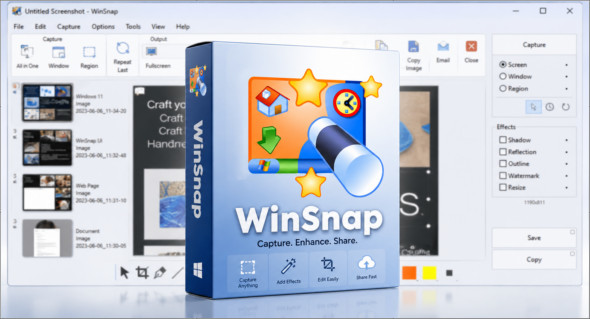
WinSnap est un petit utilitaire d’amélioration pour prendre et éditer des captures d’écran. Les fonctions standard comprennent la capture facile de fenêtres non rectangulaires avec des arrière-plans personnalisés et transparents, des transformations de toile simples et automatiques, des effets de coloration et l’ajout d’ombres portées eye-candy. WinSnap prend en charge une variété de formats d’image et dispose de fonctionnalités avancées d’enregistrement automatique. Vous pouvez également utiliser CyberLink Screen Recorder.
Here are some features of "WinSnap":
• Flexible screenshot capabilities
• Smoothing shadow effect in the Photoshop style
• Powerful image processing and basic canvas transformations
• Support for various image formats and advanced automatic backup options
• Easy web publishing and email sending
• Multilingual user interface (Unicode-based)
• Easy to take screenshots of windows with rounded corners
• WinSnap saves information about the shape of the window and adds true smoothing shadows.
• Alpha channel transparency and PNG/TIFF are supported.
• The unique “Application” capture mode allows you to capture all visible windows of the foreground application with a single click.
• The unique "multi-object" capture mode allows you to select multiple windows on the screen and easily combine them into a single screenshot.
• Basic colouring effects and canvas transformations.
• Advanced options for automatic saving and automatic copying.
• Configurable external tools menu to open and optimize image editors.
• Usual keyboard and mouse control (replaces the print screen).
Do all this work with a smaller app
Conclusion
WinSnap est un outil pratique et léger pour réaliser rapidement des captures d’écran sous Windows, avec des options supplémentaires pour sélectionner une fenêtre, une région ou l’écran complet. Ses fonctions d’annotation, d’effets visuels, d’ombres, de reflets et de redimensionnement permettent d’obtenir des captures plus propres et plus professionnelles sans passer par un logiciel de retouche complexe. Simple à utiliser et peu encombrant, il convient aussi bien aux tutoriels, présentations, documentations qu’à un usage quotidien.
Version : 6.3.0
Language : Multilingual (French included)
Size : 11.74 Mo
Configuration:
– Windows (x64 Bits): 7, 8, 10, 11
Download WinSnap v6.3.0 + Portable
Cet article a été mis à jour le 29 August 2026