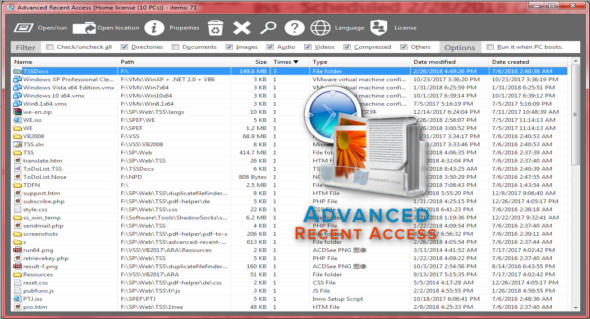
Advanced Recent Access is designed to display and open recently used resources (directories and files). You can view the properties of these more recent resources, such as file name, modification date, path, size, type, creation date, etc.
See more properties of recently used resources
– Displays the path, size, type and modified/created date of recently used resources.
– Automatically record accessed times.
– Automatically delete recent resources that do not exist.
– Can quickly filter recent resources by their types, such as
directories, documents, images, audio, videos, compressed files and others.
– Automatically refresh the list of recent resources.
– Automatically remember the order and width of the columns,
sorting column and order.
– Automatically remember the size and location of the main window.
– Can hide certain columns that you don't want to see.
What's new :
Important (I): fully supports native mode.
* I: fully supports native German.
* I: Added the option "Run when PC starts" (previously, ARA would always start automatically, cannot be set).
* I: Interface optimization: more beautiful, more user-friendly and easier to use.
* I: can now directly display the update history if the new version is available and you have chosen to display updates (in previous versions, simply access the "Update History" segment but do not manually expand it to see the update history).
* Removal of the "Add to Quick Launch bar" option from the installer, as it has no meaning from Windows Vista onwards.
* Changed the color of the separator from black to grey for the interface to make it more user-friendly.
* The license agreement for the optimized installer.
* Official website optimized.
* Optimized internal efficiency.
Configuration:
– Windows (x32/x64 Bits): XP, Vista, 7, 8, 8.1, 10
– Processor: 1 GHz
– RAM: 1 GB
– Disk space: 1 MB
Language Multilingual (French not included)
Size : 0.6 MB
This article was updated on March 22, 2018