ES File Explorer is an important file manager and application for all Android users. You can also use File Manager Plus.
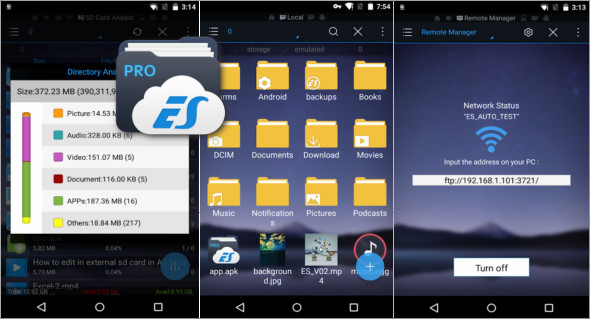
ES File Explorer helps you manage all your files, whether they're stored on your device's internal memory, microSD card, LAN, or cloud storage accounts. By default, ES File Explorer lets you copy, move, rename, delete, or share files to and from any of your storage locations. It also allows you to browse and access your files by category.
Features of ES File Explorer File Manager
– File manager Manage your files just like you do on your desktop or laptop computer using Multi-select, Cut/Copy/Paste, Move, Create, Delete, Rename, Search, Share, Send, Hide, Create shortcut, and Bookmark. All operations can be performed on local files (on your Android device) or even remotely (from your computer over a network).
– Application Manager Categorize, uninstall, back up, and create shortcuts to your applications
– Cloud Storage : Supports Dropbox, Box.net, Sugarsync, Google Drive, OneDrive (SkyDrive), Amazon S3, Yandex and multiple cloud platforms.
– Remote file managerNote: When this feature is enabled, you can manage files on your phone from your computer.
– Built-in ZIP and RAR support : Allows you to compress and decompress ZIP files, decompress RAR files, and create encrypted ZIP files (AES 256-bit)
– Built-in viewers and players for different file types including photos, music and videos; supports third-party applications such as Quick Office for improved productivity.
– Displays thumbnails : for APK files and images
– Text viewers and editors
– Access your PC at home via your smartphone using WiFi with SMB
– Functions as an FTP and WebDAV client Manage files on FTP, FTPS, SFTP, and WebDAV servers in the same way you manage files on your SD card.
– Bluetooth file browser You can copy and paste files between Bluetooth-enabled devices. ES File Explorer (File Manager) supports OBEX FTP for browsing devices and transferring files between Bluetooth devices.
– Kill tasks with a single click, boost memory and speed up your device Includes a simple widget that stays on your home screen to show you your current RAM usage and automatically kill tasks, with a list to ignore applications you want to keep running. The Task Manager module is required for this feature.
– Cache Cleaner and Auto-Start Manager Delete unnecessary files that are taking up valuable storage space. The Task Manager module is required for this feature.
– Root Explorer : the ultimate set of file management tools for root users. Provides access to the entire file system and all data directories, and allows the user to modify permissions.
– Multilingual English, Russian, Japanese, Korean, French, Spanish, German, Italian, Czech, Hungarian, Ukrainian, Tamil, Catalan, Turkish, Lithuanian, Portuguese and more…
Version : Premium 4.4.2.12
Size : 42.80 MB
Compatibility: Android 4.2 or higher
ES File Explorer File Manager Premium v4.4.2.12
This article was updated on October 7, 2024