Silver Key is an effective software for creating self-extracting encrypted files. The interface is user-friendly, the response time is good, and there are enough options to help you encrypt your files with comprehensive protection.
The context menu integration encrypts, decrypts, and generates key files
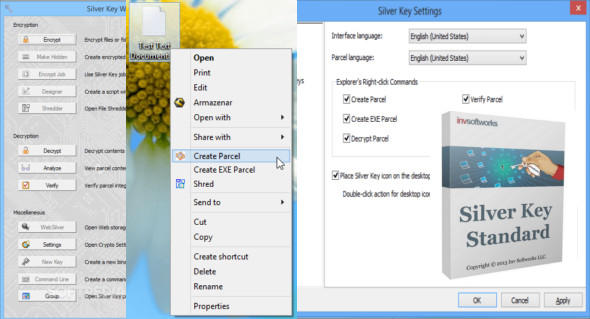
This software utility inserts several entries into the Windows Explorer context menu. More specifically, they allow you to shred files and create simple packages or EXE files.
Send your files securely
Right-click the file or folder you want to send and select "Create…". Silver Key compresses and encrypts your data and includes a small decryption program. Your recipient doesn't need to install the decryption program, as the package already contains all the necessary software.
When you encrypt files, you must specify their path using a file explorer, and you can also view the contents of a specified TXT file as an unencrypted description. The source files can be shredded after encryption, and the number of passes can be set using a slider.
The program can also help you generate a cryptographically strong and random binary key, and store it as a key file (KF format) in a custom location on the hard drive, with or without a comment string.
Computer performance will not be affected in any way, as CPU and memory usage is kept low at all times, regardless of the process running.
Configuration:
– Windows (x32/x64 Bits): XP, Vista, 7, 8, 8.1, 10
– Processor: 1 GHz
– RAM: 1 GB
– Disk space: 50 MB
Language Multilingual (French included)
Size : 20.4 MB
This article was updated on April 22, 2018