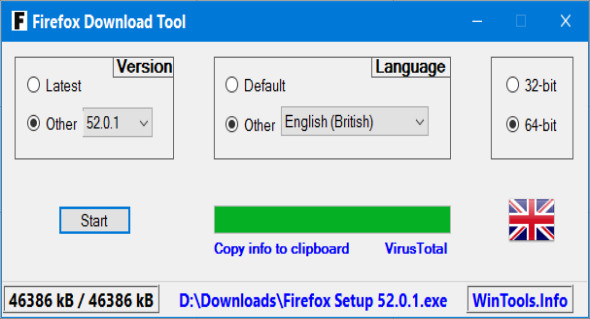
The Firefox Download Tool is used to download different versions and language variants of the Firefox internet browser. By default, the software always downloads the latest version; however, it is also possible to select older versions. Furthermore, the tool can be used to select the language variant of Firefox and choose between the 32-bit and 64-bit versions.
Information about the selected Firefox version is displayed at the bottom of the window. The download begins when you click the Start button. The progress bar provides information about the download's status. When the download is complete, the Firefox installation file will appear in the specified directory. The text at the bottom of the window will become active and turn blue. This text can be used to initiate the installation of the downloaded file.
The Copy function displayed below the progress bar is used to copy the following information about the downloaded file to the clipboard:
– Information related to the Firefox version: Version ID, language, 32-bit or 64-bit
– The file name and path
– The download URL
– The MD5, SHA1 and SHA256 information required to verify the integrity of the download
The "VirusTotal" text is used to directly check the downloaded file for virus protection. This function only works correctly if the associated file has already been added to the "VirusTotal" database. If the file in question has never been checked before, it can be downloaded for free at any time. Once the file is downloaded, Firefox's download tool will load the appropriate VirusTotal page.
Configuration:
– Windows (x32/x64 Bits): XP, Vista, 7, 8, 8.1, 10
– Processor: 1 GHz
– RAM: 1 GB
Language : English
Size : 0.06 MB
This article was updated on June 23, 2018