This software utility helps you determine the value of a resistor based on its color code, generate the color code corresponding to a specific resistor value, and correctly identify the colors within a complex image. It also handles codes printed on SMD resistors in various standards and calculates the resulting value of two resistors connected in series or parallel. There are separate pages dedicated to each of these operations, which can be selected using the large buttons on the left side of the program window. The first two pages are mouse-operated, while the third and fourth pages can be controlled with either your mouse or keyboard. A simple and ergonomic design, with larger fonts and buttons, and an intuitive interface are just some of the program's advantages. The program's code has been optimized for the latest versions of Windows.
Color codes
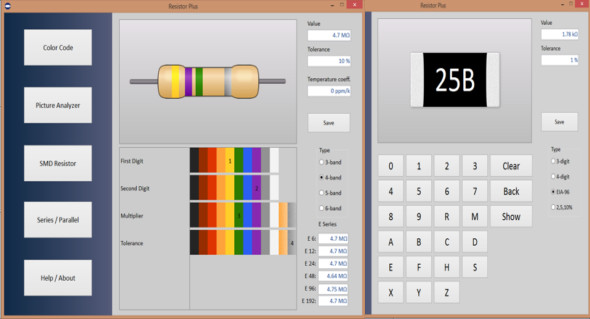
The first page displays a "blank" resistor, as in this image, and you must select the number of bands or the resistance value to calculate it. The horizontal color palettes correspond to each band, with the color coding the different digits, the multiplier, the tolerance, or the temperature coefficient of the resistor. Once you click on these palettes, the bands will appear on the image; when this process is complete, the data will be displayed in the fields at the top right. The closest values, corresponding to the different series (different tolerances) E6 to E192, will be displayed in the fields at the bottom right. The image containing the resistor and the color bands can be saved (Save button) as a JPEG or bitmap image.
Image analyzer
The second page allows you to load an image (JPEG or bitmap format) of the resistor(s) to determine the value. When you move the mouse cursor over the image, the color of the current pixel is decoded into its RGB components and displayed in the lower right corner. Select the number of bands you see, then click on the closest colors in the horizontal palettes. When all the bands are selected, the data (value, tolerance, coefficient) will be displayed in the appropriate fields.
SMD Resistor
The third page is dedicated to SMD (Surface Mounted Device) resistors. The value calculator can decode 3- and 4-digit codes containing the letters R and M (R is the decimal point and M is used for milliohm values). Another commonly used code is the three-character EIA (Electronic Industries Alliance) system, called EIA-96. This system is used for SMD resistors with a tolerance of 1 % and uses additional letters to encode the multiplication factor, as shown in the following image. A similar scheme, starting with the multiplier letter, is used for resistors with tolerances of 2.5 and 10 %. For example, A55 signifies a 330-ohm resistor with a tolerance of 10 %. This resistance calculator can also be controlled via the keyboard; in this case, Clear is the period (.) key, Backspace is the Backspace key, and Display is the Enter key. When the code is complete, the image of the resistor can be saved in JPEG and Bitmap formats to your disk drive.
Series/Parallel
If two resistors are connected in series or parallel, the equivalent resistance of the circuit can be easily calculated on the fourth page of the service. Simply enter the values, select the units of measurement, choose the circuit type, and then press the Calculate button. The total value is calculated to a precision of 5 digits, which is sufficient for any resistance tolerance.
Configuration:
– Windows (x32/x64 Bits): XP, Vista, 7, 8, 8.1, 10
– Processor: 1 GHz
– RAM: 1 GB
Language : English
Size : 5.6 MB
This article was updated on August 17, 2018