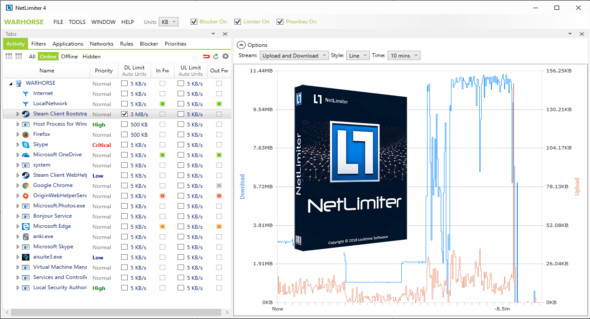
NetLimiter gives users complete control over their network connection. With NetLimiter, you can decide which applications are allowed to connect to the internet and how much total bandwidth they are allowed to use. You can also use GlassWire.
This software is the perfect solution for controlling and monitoring internet traffic and setting download rate limits for applications. NetLimiter offers a comprehensive suite of internet statistics tools. It includes real-time traffic measurement and long-term internet traffic statistics per application.
Features of NetLimiter Pro:
– Ability to limit the bandwidth of applications, connections and filters.
– Firewall rule to allow or block incoming/outgoing connections. Option to ask the user what to do.
– Total control of internet bandwidth on applications and computers
– Monitoring of applications, network connections and filters.
– Firewall and limit rule editor.
– Network traffic filtering.
– The NetLimiter client can connect to another computer running NetLimiter.
– Long-term traffic statistics.
– Priority rule to prioritize selected traffic using a simple interface.
– Allow or deny the user control or monitoring by NetLimiter.
– Real-time traffic dashboard for the selected application, connection, or filter.
– Option to start/stop the rule at a given time.
– Scheduled access to NetLimiter functions.
– Support for IP protocol version 6.
– Fully customizable behavior using user-defined rules and filters
Version : Pro 5.3.21
Language : Multilingual (French included)
Size : 8.26 MB
Configuration:
– Windows (x32/x64 Bits): 7, 8, 8.1, 10, 11
Download NetLimiter Pro v5.3.21
This article was updated on March 2, 2025