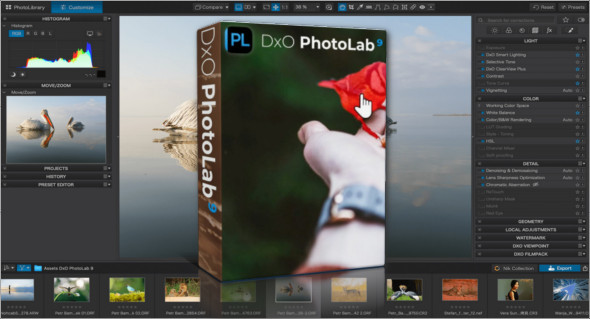
DxO PhotoLab software gives you all the tools you need to enhance your photos quickly and with minimal effort. It includes a comprehensive set of supported smart fixes that you can adjust manually. You can also use ON1 Photo RAW.
With DxO PhotoLab, you can control your images by removing distortions, correcting colors, adjusting highlights, and using other features that deliver stunning results. It's a professional application for professional photographers, offering the most flexible and powerful image processing and correction tools.
Express your creativity with adjustments
Give your photos an artistic touch by manually applying selective corrections to specific areas of your image, using exclusive DxO local adjustment tools, including: control points (U Point technology), graduated filters, manual and automatic brushes, automatic repair tool, etc.
Processing large series of photos
– Intelligent algorithms adapt the settings to your equipment and the image content
– Copy and paste the settings from one image to another
– 30 built-in presets, fully customizable to give your photos the look you love
– Multiple exports in one click
– Export to multiple formats for web, print, or backup
– Export directly to social networks such as Facebook, Flickr, or other photo editors
Fully adapted to your workflow
– File management compatible with your computer (no import step required)
– Direct access to images
– Seamless integration with Lightroom via a plug-in
– Customizable workspace to adapt to your needs – Dual-screen user-friendliness
Dxo smart lighting
Optimizes the dynamic range of your image and brings out details in underexposed and overexposed areas.
DxO Clearview
Intelligently increases local contrast and effectively suppresses distant fog.
DxO Prime
Automatically destroys high ISO RAW images and recovers precise details and colors based on proprietary algorithms.
Optical corrections
Take advantage of your equipment with tailored automatic corrections based on DxO's recognized scientific expertise in measurement and calibration.
Checkpoints
Manually select your editing area by simply clicking on the part of your image you wish to adjust.
Brush Tool
Paint freely and manually adjust small or large areas of your image.
Gradient tool
Simulates a graduated ND filter and allows you to apply artistic effects.
Repair tool
Allows you to remove dust spots or unwanted objects from your photos
Version : 9.2.0.524 / Mobile: 9.2.0.524
Language : Multilingual (French included)
Size : 398.32 MB / Portable: 2.89 GB
Configuration:
– Windows (x64 Bits): 10, 11
Download DxO PhotoLab v9.2.0.524 Elite
Download DxO PhotoLab Portable v9.2.0.524 Elite
This article was last updated on November 5, 2025