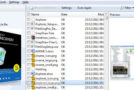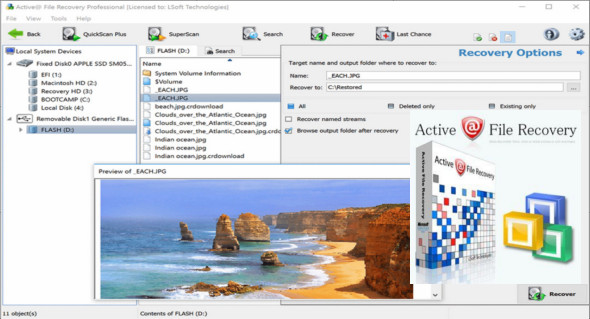
Active@ File Recovery is an easy-to-use tool for efficiently recovering deleted or lost files, damaged or reformatted volumes, even if your PC won't boot. It recovers NTFS, ReFS, FAT, exFAT, HFS+, XFS, JFS, UFS, Ext2/3/4, and BtrFS. The recovery software can detect and recover files, volumes, and disks lost due to deletion, formatting, physical damage, viruses, and more.
Main features:
– Recover files deleted after emptying the Recycle Bin or files that were deleted via the Recycle Bin
– Recover files lost due to accidental damage related to disk formatting caused by a virus attack, malware or power outage.
– Recover deleted photos and images from a USB drive or images lost after formatting a memory card (SD, CompactFlash)
– Data recovery when the partition or volume is deleted, damaged, or formatted, or when the disk has bad sectors
New features:
– Predefined recognition of file signatures: Microsoft SQL Server databases (MDF), virtual hard disk files (VHDX)
– Support for data recovery from Microsoft's ReFS version 3.x file system
– Improvements to data recovery from Linux/Unix JFS and XFS file systems
– Improved management of dynamic virtual disk arrays: Microsoft's LVM, LDM, and Linux software
– Improved software stability when working with damaged disks
– Improved management of Windows Storage Spaces partitions
– Data recovery for the ReFS file system with non-standard sector sizes: 1024, 2048 and 4096 bytes
– Improved custom signature script for creating user templates that allow searching for deleted files by their signatures
Supported features:
– FAT, exFAT, NTFS, ReFS, Apple HFS+, Unix UFS, XFS, JFS, Linux Ext2/3/4, BtrFS.
– Hard drive, hard drives, SSD, USB, IDE, SATA, eSATA, SAS, SCSI, USB flash drive, SD, MMC, CompactFlash.
– RAID rebuild (RAID-0/1/5, Span).
– Recovery of deleted/damaged partitions.
Active @ Scan technology allows you to recognize files based on their signatures for the following 155 file types:
– Adobe files (*.pdf, *.aep, *.psd, *.swf)
– Camera Raw files (*.crw, *.cr2, *.dng, *.raf, *3fr, *.kdc, *.dcr, *mrw, *.mos, *.raw, *mef, *nef, *.orf, *.rw2, *.pef, *.srw, *.erf, *.x3f, * .arw, *.sr2, *.srf)
– Compressed archives (*.7z, *.arc, *.arj, *.bz2, *.gz, *.lz4, *.lzh, *.tar, *.cab, *.rar, *.xz, *.zip, *.zoo)
– Electronic books (*.djvu, *.fb2, *.lit, *.qbw, *.rb)
– File system metadata (*.iso, *.Sdir, *.Sfile, *.Sindx)
– FileMaker Platform (*.fp3, *.fp5, *.fmp12, *.fp7)
– Formatted text files (*.chm, *.xml, *.htm, *.rtf)
– Microsoft and OpenOffice documents (*.rpt, *.mdb, *.xlsx, *.xls, *.msg, *.doc, *.docx, *.odb, *.odf, *.odg, *.odp, *.ods, *.odt, *.ole, *..pst, *, pptx, *.ppt, * .vsd, *.xps, *.pub, *.one)
– Miscellaneous (*.max, *.dwg, *.3ds, *.dxf, *.eps, *.fdb, *.stl)
– Music and audio files (*.4xa, *.aac, *.ac3, *.aiff, *.aiff, *.flac, *.mid, *.ape, *.mp3, *.ogg, *.ra, *.au, *.mmf, *.wav, *.wvc, *.wma)
– Photos and images (*.bmp, *.cmx, *.cdr, *.gif, *.ico, *.jp2, *.j2c, *.jpg, *.c4d, *.mng, *.pcx, *.png, *.tif, *.ani)
– QuickTime Multimedia (*.3g2, *.3gp, *.cdc, *.dcf, *.f4v, *.jpa, *.jpm, *.jpx, *.m4a, *.m4b, *.m4p, *.m4v, *.maf, *.mj2, *.mov, *.mp4, * .mpg, *.mqv, *.sdv)
– Video files (*.4xm, *.asf, *.amv, *.avi, *.fli, *.flc, *.flv, *.mxf, *.mkv, *.mpg, *.mts, *.mpeg, *.m2v, *.r3d, *.rm, *.rmvb, *.wmv)
– Microsoft SQL Server databases (*.mdf) and virtual hard disk files (*.vhdx)
Configuration:
– Windows (x32/x64 Bits): XP, Vista, 7, 8, 8.1, 10
– Processor: 1 GHz
– RAM: 1 GB
Language : English
Size : 43.3 MB
This article was updated on November 8, 2018