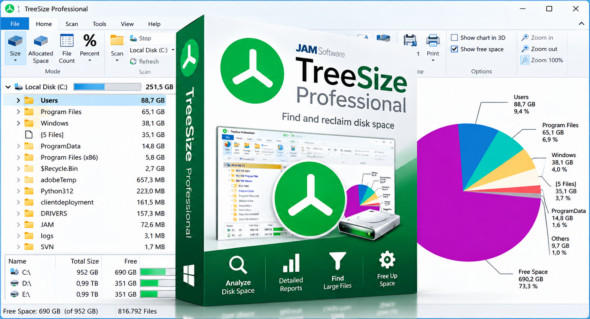
TreeSize Professional is a powerful and flexible disk space manager for Windows. The software shows you the size, allocated and wasted space, number of files, last access date, file owner and corresponding permissions, NTFS compression ratio, and much more information for multiple folders or drives of your choice.
The TreeSize Pro utility also allows you to search drives, servers, or the entire network for old, large, temporary, or duplicate files. Search results can be moved, deleted, or exported to a ZIP file. You can print detailed reports or export the collected data to Excel, HTML, XML, or a text file. You can launch TreeSize Professional from the context menu of any folder or drive. You can also use XYplorer.
Why TreeSize Professional?
– Manage and clean disk space efficiently
– View disk usage
– Detailed analysis, down to the lowest directory levels
– Search for and delete redundant files
– Numerous export and reporting options
– Versatile duplicate file search
Efficient disk space management
– View the size of all folders, including their subfolders, and break it down to the file level.
– Visualize disk usage in the pie or bar chart.
– The tree views visualize the hierarchies and size of the subfolders in the selected directory.
– Detailed view with unique files and additional information (e.g., date of last access).
– Statistics on file types and file owners for each branch.
– Filter the file system tree on the left based on a given user or file type.
– See a list of the 100 largest files.
– Distribution of disk space occupied by file age.
– Analyze FTP, WebDAV and SharePoint servers.
– Disk space management on smartphones and mobile devices.
Version : Pro 9.9.1.2401
Language : Multilingual (French included)
Size : 64.23 Mo /Portable: 101.03 Mo
Configuration:
– Windows (x64 Bits): 7, 8, 10, 11
Download TreeSize Professional v9.9.1.2401
Download TreeSize Professional Portable v9.9.1.2401
Cet article a été mis à jour le 15 October 2026