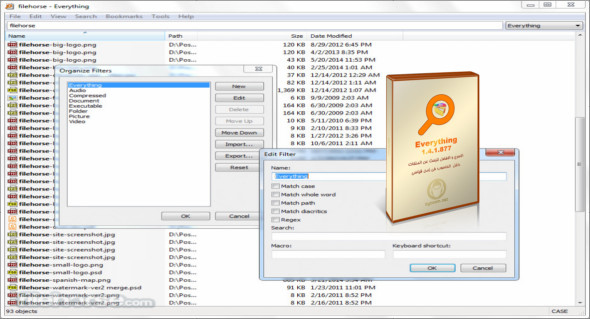
Everything is an excellent search engine for Windows that allows you to instantly locate files and folders by name or file format. You can also use TreeSize Professional.
Everything works faster than standard Windows search and other similar programs. You simply type the necessary word or symbol into the search field and get the result instantly, and you can filter the search to limit the number of files and folders displayed.
An excellent utility for instant file searching: unlike other similar programs, it doesn't create huge indexes that take up hard drive space or slow down the system. Its ingenious design is simple and uses NTFS tables generated by the system itself. Therefore, you'll have no trouble quickly finding the file you're looking for on any NTFS partition. It can scan multiple sections at once, perform searches by full or partial name, and can also be integrated into the Start menu or context menu.
The advantages of the program:
– The speed of the search. The search is completely instantaneous.
– Low resource consumption, the program mostly remains silently in memory and does not request anything, it only appears when you press a given shortcut key.
– Search for and access files on an HTTP, ETP and FTP server.
– Portable version available
– And again
Version : 1.4.1.1009
Language : Multilingual (French included)
Size : 6.25 MB
Configuration:
– Windows (x32/x64 Bits): XP, Vista, 7, 8, 8.1, 10
Everything 1.4.1.1009 + Portable
This article was updated on June 4, 2021