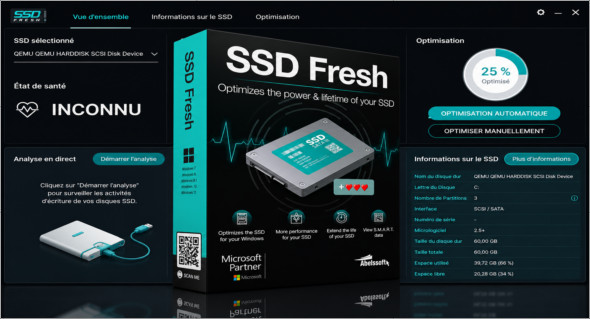
Did you know that your SSD has a limited lifespan (number of write accesses per memory cell)? SSD Fresh software helps you extend the life of your SSD and disable all unnecessary write activity on your system.
This program displays all SSD drive information, providing details about your drive and manufacturer, as well as general information relevant to the hard drives installed in your computer. You can view, for example, the storage capacity and the amount of space already occupied, with detailed information.
The tool also includes boot file defragmentation, Windows defragmentation, file indexing, prefetching, timestamp creation, Windows logging, backup, system recovery, and more. You can also use Tweak SSD.
See SMART Data
Modern hard drives use a self-monitoring system called SMART (Self-Monitoring, Analysis, and Reporting Technology). It analyzes the drive and reports defects before they cause data loss. SSD Fresh reads this information and displays it in the window.
Disable Windows Defragmentation
Since SSDs have the same access time for all memory cells, there's no need to store them consistently. Furthermore, the defragmentation process generates write operations that reduce the lifespan of the SSD. Therefore, it is strongly recommended to disable the defragmentation process.
Disabling timestamps
Windows stores the access time for each file access. This produces unnecessary write hits and will therefore reduce the lifespan of your SSD. Disabling this feature is strongly recommended.
Pre-relax
Prefetch supports preloading frequently used applications into RAM. Due to the fast access times of SSDs, this feature is unnecessary and can be disabled.
Disable startup file defragmentation
Due to the way files are stored on SSDs, defragmenting boot files makes no sense and should be disabled, as it reduces the lifespan of your SSD.
Disabling Windows event logging
Windows constantly logs changes to system configuration, as well as crashes and other events from various services and programs. This creates unnecessary write access and reduces the lifespan of your SSD.
Memorize the abbreviated name
To ensure compatibility with older 16-bit DOS applications, Windows creates shortened names for folders and files, which results in additional write access to your SSD. Modern applications do not need these names, so they can be disabled.
Version : 16.02.76570
Language : Multilingual (French included)
Size : 13.91 Mo
Configuration:
– Windows (x32/x64 Bits): 7, 8, 10, 11
Download Abelssoft SSD Fresh Plus 2026 v16.02.76570 + Portable
Cet article a été mis à jour le 6 October 2026