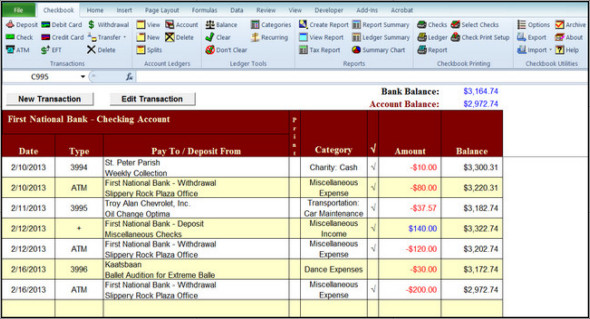
Checkbook for Excel is a really easy-to-use Excel application that helps reduce worries about tracking expenses, deposits, service charges, and other account-related details.
Checkbook for Excel can be customized to track expenses, flag tax-related events, manage spending, deposits, and fees with PayPal, prepare and print reports, and even print checks. All you have to do is create a sheet for each financial account you want to manage. Here, you'll be prompted to provide the details (creditor's name and address, amount, recurring, etc.) of each expense and deposit. And it's in these details that the complexity of managing your finances becomes much less complex.
The most challenging part of Checkbook for Excel is remembering to enter data, especially ATM withdrawals. You can also split category designations, which is particularly useful if you want to track childcare expenses that may have tax implications.
Features :
– The ability to add an unlimited number of income and expense categories.
– The ability to track 50 separate financial accounts.
– Possibility of splitting transactions into ten different categories.
– Possibility of designating categories as reference tax forms and tax-related tax forms.
– A personalized tax return that summarizes tax-related transactions by category and form.
– The ability to add and store address information and to print addresses on checks.
– Ability to import data from Quicken Interchange Format (.QIF) files.
– Seamless import of downloaded PayPal transactions.
– The enhanced Checkbook Companion application based on Palm OS and synchronized with Checkbook for Excel.
– Improved expense and revenue reporting.
– New type of transaction: “Electronic Funds Transfer”.
– The ability to schedule recurring transactions.
– The ability to individually customize the formatting of the general ledger.
– The ability to change the colors of the ledger.
– Improved international formatting of dates and currencies.
– Additional options for archiving old transactions from the program's records.
– Ability to rename sheet tabs for general ledger sheets.
– Possibility of creating a copy of the register(s) with splits displayed.
– Automatically locates the cell cursor in transactions entered and/or modified during entry.
– Adds a keyboard shortcut and a dialog box for the speech recognition functionality.
– New and improved checkbook toolbar.
– Improved modification of category and transaction account.
– New double-click functionality.
– New feature to export logs and reports.
Configuration :
– Windows (x32/x64 Bits): XP, Vista, 7, 8, 8.1, 10
– MSO Excel (x32/x64 Bits): 2007, 2010, 2013, 2016
– Processor: 1 GHz
– RAM: 1 GB
Language : English
Size : 4.73 MB
This article was updated on January 21, 2019