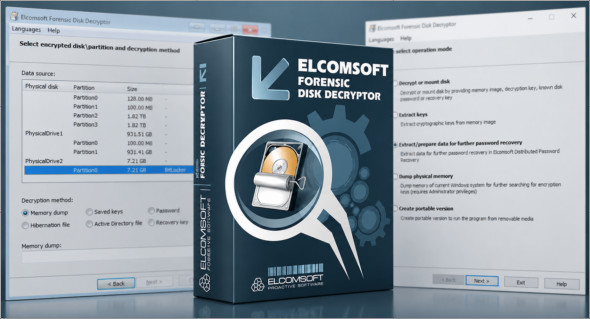
Elcomsoft Forensic Disk Decryptor software allows you to decrypt data from encrypted containers or create encrypted folders. The software scans the PC and its data to extract cryptographic keys from RAM captures, hibernation, and page files, and uses plaintext passwords to decrypt files and folders stored in encrypted containers or mounted encrypted drives. It supports BitLocker, BitLocker To Go, FileVault 2, PGP, and TrueCrypt volumes.
Elcomsoft Forensic Disk Decryptor offers all available methods for accessing information stored on BitLocker, FileVault 2, PGP, TrueCrypt, and VeraCrypt encrypted disks and volumes. The toolkit allows the use of plaintext passwords, volume registration or recovery keys, and binary keys extracted from the computer's memory image or hibernation file. FileVault 2 recovery keys can be extracted from iCloud using Elcomsoft Phone Breaker, while BitLocker recovery keys are available in Active Directory or the user's Microsoft account.
Full decryption, instant editing, or attack
With fully automatic detection of encrypted volumes and encryption settings, experts only need to provide the path to the encrypted container or disk image. Elcomsoft Forensic Disk Decryptor will automatically search for, identify, and display encrypted volumes and details of their corresponding encryption settings.
Real-time access to encrypted information
In real-time mode, Elcomsoft Forensic Disk Decryptor mounts the encrypted volume as a new drive letter on the investigator's PC. In this mode, forensic specialists gain fast, real-time access to protected information. Information read from mounted disks and volumes is decrypted on the fly in real time.
No decryption key and no recovery key?
If neither the decryption key nor the recovery key is available, Elcomsoft Forensic Disk Decryptor will extract the metadata needed to brute-force the password with Elcomsoft Distributed Password Recovery.
Support EnCase .E01 and portable version
Elcomsoft Forensic Disk Decryptor 2.0 now fully supports standard .EO1 EnCase images, as well as encrypted DMG images. Furthermore, Elcomsoft Forensic Disk Decryptor can be used to create a portable installation on a USB flash drive.
Version : 2.21.1036
Language : English
Size : 41.11 MB
Configuration:
– Windows (x32/x64 Bits): 7, 8, 10, 11
Download Elcomsoft Forensic Disk Decryptor v2.21.1036
This article was updated on July 4, 2026