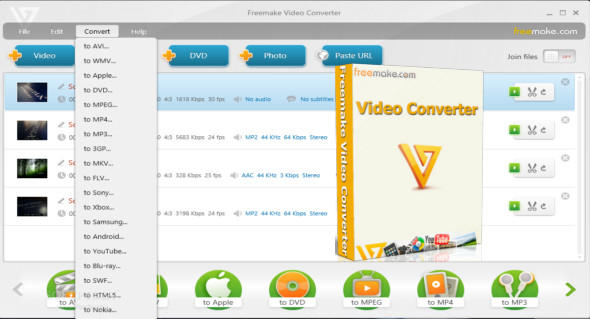
Freemake Video Converter Gold is a handy tool that allows you to convert various video files, audio files, images, and DVD files to other extensions. This tool supports different file formats such as 3GP, MP3, MKV, DVD, FLAC, etc., and features a very simple, attractive, and intuitive user interface.
Files can be added using drag and drop. The utility displays the total time and audio/video settings. You can preview the video in an external media player and easily configure the width, height, video codec, frame rate, bitrate, and image size. Once the output destination is selected, you can start the conversion process and monitor its progress.
Convert video to AVI, MP4, WMV, MKV, 3GP, DVD, MP3, iPad, iPhone, PSP, and Android phones in one click! Extract and burn DVDs. Convert YouTube to MP4, AVI, and more with Freemake! Guaranteed results.
Over 200 input formats:
Enter any video file: AVI, MP4, MKV, WMV, MPG, 3GP, 3G2, SWF, FLV, TOD, AVCHD, MOV, DV, RM, QT, TS, MTS, etc. Import music (MP3, AAC, WMA, WAV) and photos (JPG, BMP, PNG, GIF) to easily convert them into videos! All formats supported.
Output to AVI, MP4, MKV, FLV, 3GP, MP3, HTML5:
Convert videos to the most popular video formats. Extract unprotected DVD movies to AVI, WMV, MP4, MPEG, MKV, FLV, SWF, and 3GP. Convert your Flash videos and embed them directly into your web page. Create HTML5 videos (Ogg, WebM, H.264) for modern web browsers.
Burning a Blu-ray video:
Convert your movies to Blu-ray video format and burn high-quality Blu-rays for free. Create Blu-ray discs from any input content: video, audio, photos, URLs. Burn multiple Blu-ray copies and save the resulting Blu-ray video to your hard drive as an ISO image or Blu-ray folder.
Video Converter with subtitle support:
Convert DVDs, MKV, and MOV files with embedded subtitles to any video format or device. Add external SSA/SRT/ASS subtitles to any video with this video converter.
Advanced preset editor:
Take complete control of the output by customizing the conversion settings. Create your own presets by setting video and audio codecs, image size, and more. Choose an icon and save your custom preset for later use with this free video converter.
Download photos and MP3 files from YouTube:
Download videos, photo slideshows, and MP3 files from YouTube with our free video converter. Download AVI, WMV, MP4, 3GP, JPG, BMP, GIF, and MP3 files from YouTube. The program will trim the videos (if necessary) into 15-minute segments and insert them into a YouTube playlist.
Creating slideshows and visualizations:
Turn photos and MP3s into slideshows with background music for free. Edit your slideshow: add or delete photos, and activate the panning effect. Create musical visualizations and share photos on YouTube.
Cut, Join, Rotate, Limit size, Adjust:
Trim video segments from your file. Flip or rotate the video. Join multiple videos into a single file, add transitions between segments. Adjust the output file size to any limit (e.g., 700 MB, 1.4 GB, 4.7 GB). Adjust the video output to the established aspect ratio: add black bars, zoom, and automatically adjust.
Configuration :
– Windows (x32/x64 Bits): 7, 8, 8.1, 10
– Processor: 1 GHz
– RAM: 1 GB
Language : Multilingual (French included)
Size : 48.8 MB
This article was updated on February 22, 2019