The Ontrack EasyRecovery Toolkit utility provides users with a complete solution to protect, restore, and repair files and data in all formats. It protects data stored on hard drives or SSDs with proactive disk monitoring to prevent data loss. You can also download Ontrack EasyRecovery Technician.
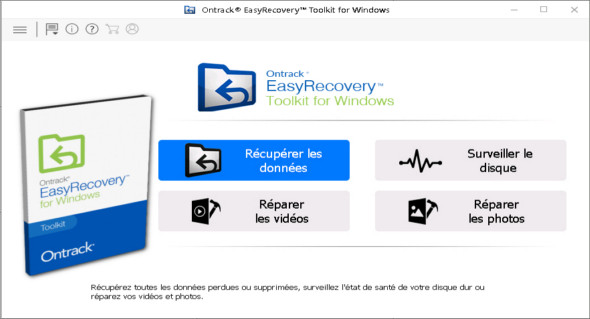
EasyRecovery Toolkit software contains several functions, allowing you to recover data, monitor the disk, repair photos, and repair videos. Ontrack EasyRecovery can restore damaged or deleted files, as well as recover data from formatted or corrupted volumes, even from formatted disks. It offers unlimited recovery from local storage and external media and works with all types of drives.
Ontrack EasyRecovery Toolkit provides users with the necessary tools to successfully perform recovery operations on Windows, Mac, and Linux operating systems and storage devices, as well as the most efficient recovery of RAID logical partitions and data from formatted hard drives and systems.
The program supports 300+ file types, allowing you to recover data from deleted volumes, formatted volumes, deleted files and folders, lost partitions, email files, documents, and multimedia files. The intuitive software features a wizard-assisted interface, enabling even novice users to easily recover data.
Features of the Ontrack EasyRecovery Toolkit software:
– Data recovery
– Repairing photo and video files
– Disk monitoring
– Disk defragmentation
– Save the scans and resume recovery later
– Search for a specific type of file in a specific logical drive/folder
– Preview recoverable files before saving them
– Optical media recovery (CDs, DVDs, Blu-ray discs, HFS, HFS+, HFSX, Rock Ridge, ISO 9660, Joliet and UDF)
– Retrieves data written to disks using packet writing software (InCD, Drag To Disk, Direct CD, DLA)
– Retrieves files from RAID 0, 5 and 6 storage
– Supports the creation of virtual RAID
– Supports recovery from RAID software
– Raw recovery of RAID hard drives
Version : 16.0.0.5 /Portable: v15.2.0.0
Language : Multilingual (French included)
Size : 174.95 MB / Laptop: 304.07 MB
Configuration:
– Windows (x64 Bits): 7, 8, 8.1, 10, 11
Ontrack EasyRecovery Toolkit 16.0.0.5
Ontrack EasyRecovery Toolkit Portable v15.2.0.0
This article was updated on May 2, 2024