Rohos Disk: This program allows you to create hidden and protected partitions on your computer or USB drive and to create a password that protects/locks access to your applications. You can also use Folder Lock.
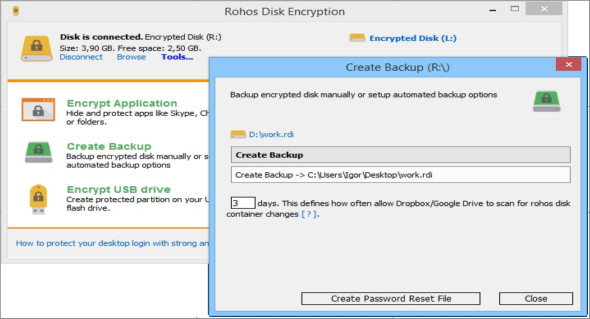
You can hide your files with the option that offers AES 256-level encryption to enhance security by preventing unauthorized users from accessing your internet applications, such as Google Chrome, Firefox, and Skype, on your PC, whether local or network users. The partition password reset option allows you to create a backup file to access your secure drive if you forget your password or lose the USB drive. There is no risk of data loss.
Strong, on-the-fly encryption of disks
The Rohos drive uses a NIST-approved AES encryption algorithm with a 256-bit encryption key length. Encryption is automatic and on the fly.
Easy to use
Your first encrypted drive can be activated with a single click or automatically at system startup. Disk notifications let novice users know when the secure partition is ready to use.
Unlimited encryption capacity
You can have an unlimited number of additional encrypted virtual drives on your network storage, USB drive, or DVD-ROM. There is no limit to the size of the virtual drives. Each secure drive can have a shortcut to open it.
Portable data security solution
You can have a protected partition on your USB drive and access it from any computer. Rohos has a portable component that can be installed on any USB drive with a secure partition.
Having a USB key for access control
You can use a USB flash drive or security tokens like Aladdin eToken to automatically access all your secure drives without having to remember and manually enter your password.
MS Office application integration
You can open or save your protected documents directly from MS Word (Excel) by clicking the personal drive icon. You don't need to navigate to subfolders or an additional drive letter.
Does not require administrator privileges
You can access your virtual drive on the USB flash drive or DVD-ROM with Rohos Disk Browser on any guest computer without administrator rights.
Extensible virtual drives
Rohos Disk allows you to expand an encrypted virtual partition at any time (only for NTFS format partitions).
Steganography
Hide your sensitive files in an AVI movie or multimedia file such as MP3, OGG, WMA, etc.
Version : 3.2
Language : Multilingual (French included)
Size : 25.79 MB
Configuration:
– Windows (x32/x64 Bits): 7, 8, 8.1, 10
Rohos Disk Encryption 3.2
This article was updated on January 4, 2022