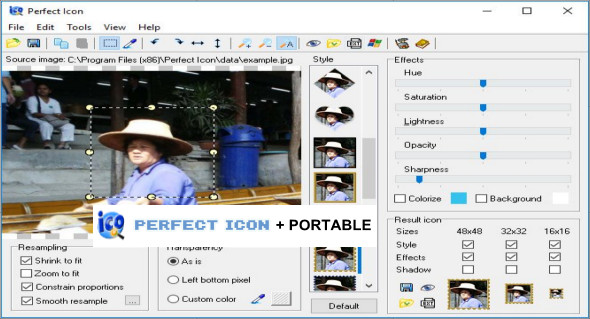
Perfect Icon is a simple tool for creating icons from images and photos. It can create stylish semi-transparent icons for Windows and adjust them in seconds.
You can change the icons on folders and files. By applying different effects, you can create unusual icons. The simple and intuitive interface makes working with the program fun. It's a quick icon creation tool! You can use this application as a portable app, meaning without installing it.
With Perfect Icon you can:
– Create elegant icons for all Windows systems, including Windows XP/7/8/10
– Apply different effects and styles to the icons
– Create semi-transparent icons with shadows for Windows XP/7/8/10
– Create icons from images, including BMP, JPEG, TIFF, GIF, PNG and other image formats.
– Create icons from screenshots
– Change folder icons
– Modify file type icons
– Customize standard Windows icons
– Repair the Windows icon cache
Configuration :
– Windows (x32/x64 Bits): XP, Vista, 7, 8, 8.1, 10
– Processor: 1 GHz
– RAM: 1 GB
Language : English
Size : 12.3 MB
This article was updated on March 25, 2019