BurnAware Professional is a powerful disc burning application for creating data discs, multisession and bootable discs, as well as compression tools and more. You can also download and use Ashampoo Burning Studio.
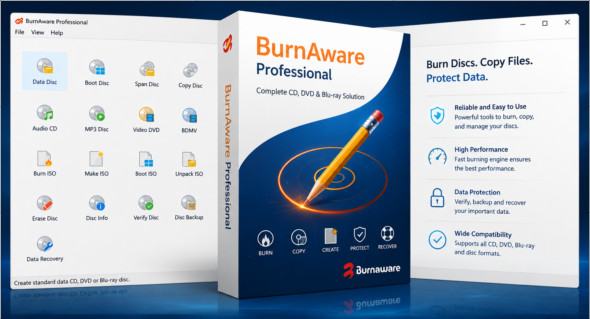
BurnAware is a feature-rich application that supports the management of all types of discs and offers a variety of powerful tools for your data. It provides a simple user interface with clear buttons and options, making it easy to create data discs, bootable discs, and burn ISO images in just a few steps. This excellent application can also create audio CDs, MP3 discs, and custom discs.
Drag-and-drop functionality allows users to quickly add data to the application and select the disc to burn. It displays the disc size along with other details. Additionally, users can choose the burning speed using the selected burning device. Save projects for future use and perform other operations, such as copying discs, managing erasable discs, extracting data from discs, and more.
BurnAware Professional Features
– Lightweight and powerful disc burning tool
– Simple and friendly environment
– Handle all types of discs (CD/DVD/Blu-Ray)
– Create multimedia discs or bootable discs
– Handling rewritable discs with erasure media
– Burning ISO images onto discs
– Copying disks and creating projects for the future
– Navigate directories using the dual-pane layout
– Drag and drop the media to add files
– Displays full details on the discs
– Choose the device and the engraving speed
– Portable version
Version : Pro 19.4 /Portable: Pro 19.4
Language : Multilingual (French included)
Size : 62.38 Mo /Portable: 58.07 Mo
Configuration:
– Windows (x64 Bits): 7, 8, 10, 11
Download BurnAware v19.4 Professional
Download BurnAware Professional Portable v19.4
Cet article a été mis à jour le 18 September 2026