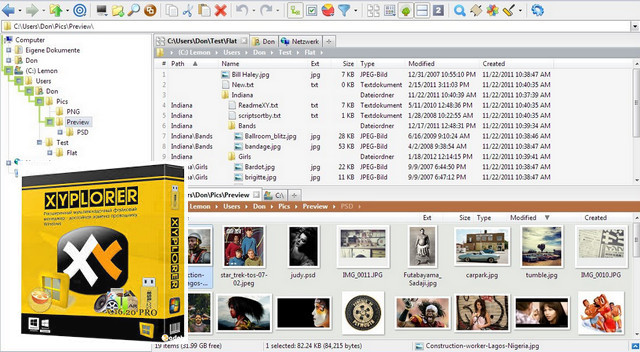
XYplorer is a multi-tab file manager that also features a powerful search engine, versatile display, a highly customizable interface, and a wide range of options allowing you to automatically perform certain recurring tasks.
XYplorer requires no installation and makes no changes to your system. You can have an unlimited number of tabs to switch between files with a single click. You can rename, hide, or lock these tabs, drag and drop them, and more. The address bar accepts not only folders, but also files, URLs, and keyword searches.
A dual-view display is available within your file manager. This allows you to view your files side-by-side. A simple press of the F10 key will disable this option.
If you need a fast browser to access your images, videos and music, XYplorer offers access in just one click, with a detailed display of information on each media.
A tag color and comments can be assigned to each of your files. Simply right-click on the file in question.
XYplorer is comprehensive, interactive and easy to use, which will save you considerable time in searching for your files.
Configuration:
– Platforms: 32-bit and 64-bit / Windows 10, 10 Server, 8.1, 8, Server 2012, 7, Server 2008, Vista, XP, Server 2003
– Pentium 4 or higher
– 256 MB of RAM
– 30 MB of hard drive space
– 800*600 Graphics Mode with 16-bit color
Facility
Simply launch the XYplorer.exe file. It's a PORTABLE version!
Activation
– Turn off the internet
– On first startup, click on [Continue Evaluation]
– Click on [Help] / [Unlock Trial Version]
– Use one of the licenses available in Licenses.txt
– You will be asked to close and reopen the program
– As a precaution, to preserve the license, it is recommended to block EXE files in your firewall.
– To switch to French, click on “Help” (top right) and “Select Language…” and double-click on the language.
If you already have a portable version and wish to keep your settings:
Copy the files and paste them into your old directory to overwrite the existing ones.
- Language: Multi
- Size: 8.61 MB
This article was updated on July 22, 2016