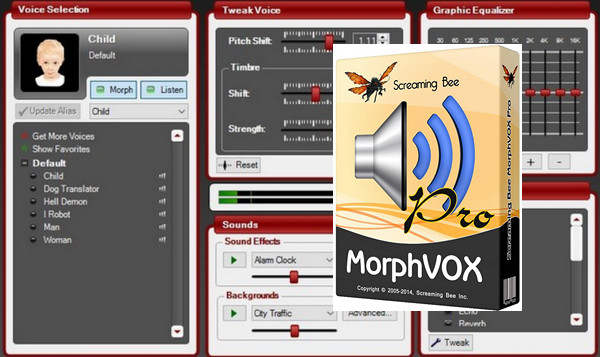
Imagine yourself in the shoes of a character and adopt their voice with MorphVOX Pro-Voice Changer. Modify your voice in real time for your online games and take on the voice of a man, a woman, a robot, a child, a demon, and many more. You can also add background noises while speaking, such as being stuck in traffic or shopping. An equalizer function is integrated, along with effects like reverb, echo, phaser, distortion, and more. These sounds can be used in your instant messaging conversations, such as MSN Messenger, Skype, and others.
System requirements:
– Operating system: Windows XP, Windows Vista, Windows 7, 8, 8.1, 10 (32 and 64 bits).
– Processor: Pentium IV or equivalent minimum.
– Disk space required: 10 MB.
– RAM: 512 MB minimum.
– Sound card compatible with Windows.
– Microphone.
Facility:
* If you are on Windows XP, before installation, make sure you have installed the .NET Framework.
**If you have installed other versions of MorphVox, uninstall them and clean the registry. You can use CCleaner, for example, or you can uninstall with IObit Uninstaller
1. Disconnect from the internet.
2. Install the program by running "MorphVOXPro4_Install-1.exe". Remember to uncheck "Run the program after installation"!
*** Do not launch the program. IMPORTANT
3. Copy "SBS.dll" from the "Crack" folder and paste it into the installation folder. This folder is usually located at C:\Program Files\Screaming Bee\MorphVOX Pro or C:\(x86)\Program Files\Screaming Bee\MorphVOX Pro
4. Optional: Install the add-ons from the "Addons" folder one by one by clicking on the .exe file.
Note: clearly indicate the software installation path for certain add-ons
- Language: English
- Size: 31.50 MB
This article was updated on July 21, 2016