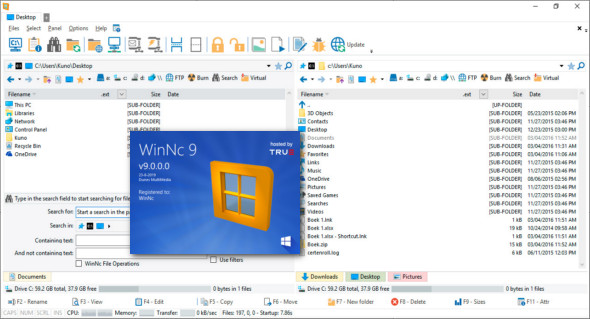
WinNC is a reliable, tab-based, multi-pane file manager that provides a fast and user-friendly environment. It features shortcuts to all special folders and includes virtual links to files.
The default Windows Explorer is unable to perform a wide range of operations, such as side-by-side file comparison and folder synchronization. For all these features in one place, WinNC is one of the best options. It provides a very user-friendly interface and simple options for gaining complete control over files and folders with minimal effort. A multi-pane layout is available for side-by-side comparison and synchronization.
Furthermore, users can easily move files and folders from one location to another at Norton Commander's blazing speed. A powerful search function helps users easily find files and folders. Apply various filters and use shortcuts for different file system operations. Target specific folders and subfolders. Synchronize folders, manage media files, and create playlists, among many other features that make this application superior to all other file managers. In short, it's a comprehensive commander offering enhanced performance and a powerful set of tools.
WinNC Manager Features
– Lightweight and powerful file commander
– Multi-panel user interface
– Tab-based environment for managing files and folders
– Manipulating and synchronizing files and folders
– Better transfer speed and improved performance
– Support for shortcut keys and function keys
– Apply filters to each operation for greater accuracy
– View the contents of multiple folders at the same time
– A powerful file manager with encryption and decryption functions
– Create MP3 playlists and manage music
– Conversion, engraving, and split/merge functions
– Create ISO images and much more
Version : 9.0.0.0
Language : Multilingual (French included)
Size : 30.87 MB
Configuration:
– Windows (x32/x64 Bits): XP, Vista, 7, 8, 8.1, 10
– Processor: 1 GHz
– RAM: 1 GB
The WinNC 9.0.0.0 manager
This article was updated on August 23, 2019