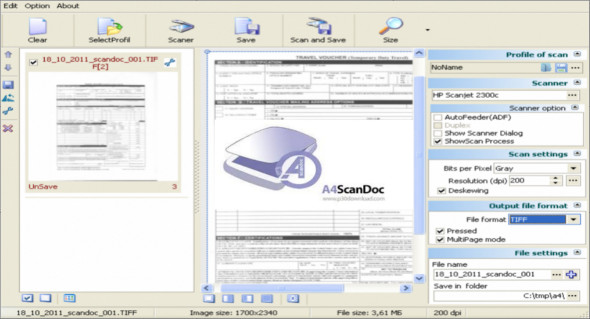
A4ScanDoc is a lightweight utility that can help you scan documents and export them to various image formats, as well as PDF files. A4ScanDoc is a practical solution that offers a range of features for automatically scanning documents and supports duplex printing.
A4ScanDoc allows you to adjust the brightness and contrast of photos, and modifications can be applied to all elements of scanned documents. The program provides a useful office function for correcting the alignment of scanned documents. Furthermore, you can customize the scan area before starting the process to reduce the amount of processing required after exporting the files.
After scanning one or more documents, they appear in the application's right-hand panel, and you can open one in the main preview area for further examination. You can save scanned documents in PNG, JPEG, TIFF, BMP, or PDF format. Furthermore, it's possible to save scan profiles and repeat the same task with just a few mouse clicks.
The features of A4ScanDoc
– Utility for scanning documents
– Supports image formats
– Scan to TIFF, BMP, JPEG, PNG
– Configure once an option to scan documents and save the profile.
– Support for ADF and double-sided scanning
– Automatic rectification function
– Support for scanning to PDF format
– User-friendly interface for scanning settings
Version : 2.0.3.5
Language : Multilingual
Size : 8.90 MB
Configuration:
– Windows (x32/x64 Bits): XP, Vista, 7, 8, 8.1, 10
A4ScanDoc 2.0.3.5
This article was updated on March 22, 2020