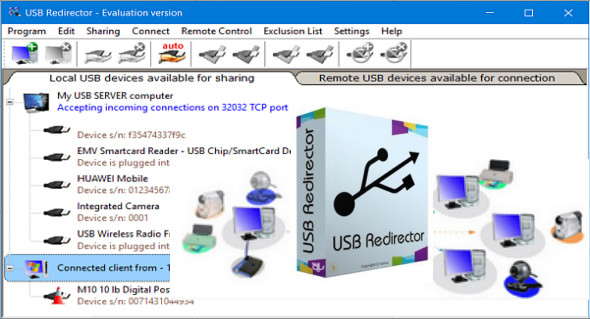
USB Redirector software allows you to access remote USB devices over a local network or the internet, as if they were directly connected to your computer! USB Redirector provides a quick solution to your remote USB needs! It can act as both a USB server and a USB client, using a standard TCP/IP connection for communication.
From now on, you can work with this USB device as if it were plugged directly into your computer. Whether you're at home or at your desk, you can use your USB device, and vice versa. USB Redirector runs as a background service, meaning you don't need to keep the application open all the time. Once you've configured the program, you can safely close it. USB Redirector will continue to run even if no users are logged in or after a restart. All the devices you've shared will remain shared. You can also use MyLanViewer Enterprise.
USB Redirector functionality:
– Access USB devices in the Hyper-V virtual machine or any other virtual machine.
– Set up a complete USB server for users on your business or home network.
– Use USB devices on a computer with damaged or missing USB ports.
– Redirect USB devices between computers on your home network or via the Internet.
– Redirect USB devices between Windows and Linux using the USB redirector for Linux.
– Limit physical access to the USB device, but make it accessible to users on your network.
– USB Redirector supports the connection between Windows 32/64 bit and Linux platforms!
– USB Redirector allows you to connect USB devices that are occupied by other clients, but not used for a certain period of time!
– CallBack connection function, allowing connection of shared USB devices that are placed on NAT in a local network!
– USB Redirector shares high-speed USB devices (USB audio devices from webcams) on the network.
– USB Redirector does not require installing the USB device driver on the PC to share it.
– IP filtering function.
– Access control list function.
– Automatic connection of remote USB devices as soon as they are available for connection
– Remote control functions.
– Restoration of network connection in case of interruption.
– Exclusion list. Flexible control of shared USB devices.
– USB 3.0 compatible.
– VMWare, Hyper-V, VirtualBox compatible.
Version : Technician 2.0.1.3260
Language : English
Size : 31.31 MB
Configuration:
– Windows (x32/x64 Bits): 7, 8, 10, 11
Download USB Redirector Technician Edition v2.3.0.3330
Download USB Redirector 6.10.0.3130
This article was updated on March 17, 2025