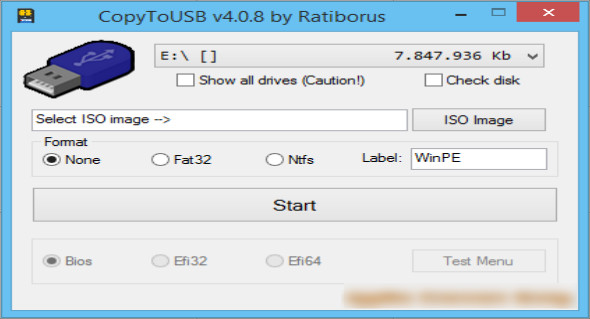
CopyToUSB is a simple and compact tool for creating bootable USB drives. It supports direct writing of WinPE, Windows, Linux, Office, and other disk images to a USB flash drive to create a bootable USB device.
Users can boot the computer by loading this USB flash drive with a shortcut key, thus quickly and easily completing the installation of the operating system or booting and running WinPE and other BootCD tools.
CopyToUSB features a simple user interface and is easy to use. It supports a variety of image file formats and can help users easily create a bootable USB drive with a single click. Later, if your system crashes or fails to boot due to a virus infection or system file corruption, this bootable USB drive, containing an operating system or independent utility, can save your operating system.
Furthermore, CopyToUSB can indirectly resolve some common problems with USB drives. It's also a portable program that doesn't require any version of Microsoft .NET Framework or other system components to run anywhere. You can also download it. WinToUSB.
Information on using CopyToUSB
– It is best to click on the drop-down menu to select the exact USB you want
– Display all drives using the “Show all drives” option
– CopyToUSB's copy speed is slow
– If you are writing a WinPE image file, it is recommended to configure a larger partition.
– The software supports 32-bit and 64-bit environments
– If the software does not open correctly, right-click on it to run it as administrator.
Version : 4.2.1
Language : English
Size : 16.40 MB
Configuration:
– Windows (x32/x64 Bits): XP, Vista, 7, 8, 8.1, 10
CopyToUSB 4.2.1 Portable
This article was updated on August 15, 2021