EaseUS Win11Builder is an application that can create a bootable flash drive for Windows 8.1/10 without manually downloading the operating system disk images. You can also use WinToUSB.
EaseUS Win11Builder lets you effortlessly access and search for Windows 11 ISO files, and displays the latest available version in its main window. Furthermore, it allows you to easily create a bootable USB drive to run Windows 11, even on an unsupported PC.
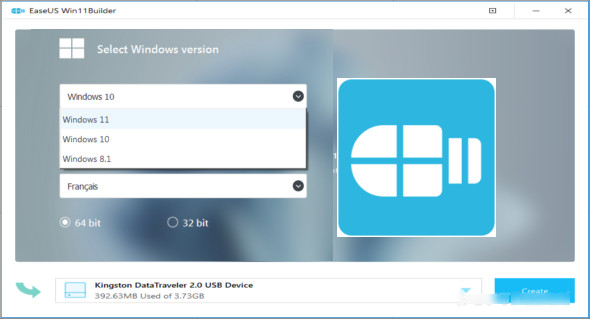
The application is easy to use for creating a bootable Windows 11 drive. First, connect the USB drive to your computer and then select it from the dropdown list. Remember that the next step is to format the entire disk, permanently erasing all the data on it. In other words, when EaseUS Win11Builder prompts you, go ahead and create backup copies of the contents on the USB drive.
Key features of the EaseUS Win11Builde application
– Download the Windows 8.1/10/11 ISO files
– Create a bootable flash drive for Windows
– Display the latest version of Windows
– You can choose the version, the language, and the kernel
– Bypassing TPM 2.0 requirements for Windows 11
– Use the application without installing it
Version : 1.5
Language : English
Size : 14.12 MB
Configuration:
– Windows (x32/x64 Bits): XP, Vista, 7, 8, 8.1, 10
EaseUS Win11Builder 1.5 Portable
This article was updated on September 29, 2021