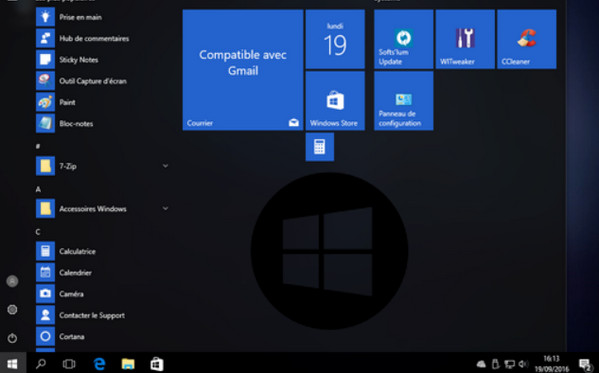
System: Windows 10 Professional & Home (64-bit)
An up-to-date release, created using Sysprep for better integration of changes.
Key points to remember
– Up-to-date system
– IumKit Deployment registry tweaks
– Services option 'Minimum' Deployment IumKit
– Accessible to all (no special removal/deactivation required and configurable with Windows Ium Tweaker)
Additional information
– Includes an answer file that allows you to automate certain tasks during the Arium installation.
– The feature to upgrade from a previous version of Windows has been removed.
– All Windows Updates are included
– Google is the default homepage in Internet Explorer
– Integration of Softs'Ium (Deployment Ium Kit), 7-Zip, WinDiff (file comparators)
– Windows Defender is disabled by default (can be reactivated with WIT)
– Cortana is disabled by default (can be reactivated with WIT)
– Telemetry disabled
– Start menu configured
– Removal of several ModernUI apps (Reinstallation possible from the Windows Store)
Register modifications
Text editor
– Notepad++ is the default program for txt, ini, and xml files. (It no longer replaces the system's Notepad.exe)
Explorer
– Remove the suffix “Shortcuts to”
– File extensions, display of hidden folders
Desk
– This PC icon
System
– Faster Windows shutdown, force-close an unresponsive application
– Logon Details
– Low disk space warning disabled
– Automatic restart in case of failure is disabled; a BSOD is displayed instead
– AutoPlay disabled
– Hibernation disabled
– Error reporting disabled
Taskbar
– Do not hide the system tray icons
Arium Windows interface
– Logon wallpaper disabled (reactivate with WIT)
– Aero Black Sliders
– Sapphire wallpaper by Slurpaza
Configuration:
– Processor: 1 GHz
– RAM: 2 GB
– Disk Space: 20 GB
– Graphics card: Microsoft DirectX 9 graphics device with WDDM driver
- Language: French
- Size: 3.1 MB
This article was updated on October 1, 2016