When you download software, it's often presented as an executable installation file (.exe). Many of these installers, especially in the Windows world, are created with Inno Setup, a popular, lightweight, and efficient packaging tool. However, there are times when you might want to access the contents of these installers without running them, whether to inspect the files, analyze their behavior, or simply extract certain elements. This is where InnoExtractor comes in, a specialized tool that allows you to easily open, view, and extract the files contained within an Inno Setup installer.
What is InnoExtractor?
InnoExtractor is software developed by Havy Alegria. It allows you to extract files from installers generated with Inno Setup, a solution widely used by developers to package their Windows programs. With InnoExtractor, you can analyze the structure of a setup, extract specific files, view embedded scripts, and see the system files contained within an installation executable.
A user-friendly and intuitive interface
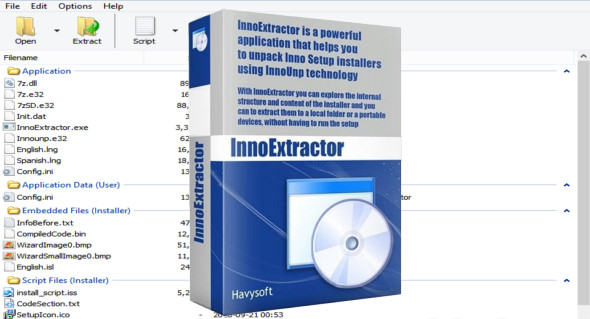
InnoExtractor's graphical interface is designed to be both simple to use and powerful. It offers a tree-like navigation of the setup file's contents, similar to Windows File Explorer, allowing users to quickly locate and export the desired files.
Clearly organized tabs allow you to easily switch between browsing files, viewing scripts, package information, or manually or automatically extracting data. You can also use IDA Pro.
InnoExtractor's main features
- Quickly open Inno Setup .exe files
Drag and drop an installation file onto the interface or use the built-in file explorer to load a file. - Viewing the setup contents
See the complete list of files included in the installer, as well as their exact directory structure. - Selective or complete extraction
Extract only the desired files, or all the content at once, to a directory of your choice. - Displaying internal scripts
The tool allows you to display certain Inno Setup scripts (depending on the compilation parameters), which can be useful for developers or analysts. - Decrypting certain encrypted packages
Although limited, InnoExtractor offers functions to attempt to read the contents of certain encrypted or protected setup files. - Built-in search and filtering
Use filters to quickly find files or file types in a complex installer. - Advanced mode for experienced users
Activate a more detailed mode with information on setup compilation, planned installation paths, commands executed, etc.
Who is InnoExtractor for?
This software is designed for several types of users:
- The developers who wish to inspect an installer to understand its structure.
- Security analysts who want to examine an executable without running it.
- Curious users who wish to access certain files without a full installation.
- IT technicians who need to retrieve software components from a machine or extract a program from it without running it.
Compatibility and performance
InnoExtractor is compatible with all modern versions of Windows (Windows 7, 8, 10, 11) and supports a wide range of Inno Setup versions. It works in portable mode (no installation required) or with a full installation, depending on your preference.
The tool is lightweight, fast and resource-efficient, making it an ideal solution to keep on hand for any task involving the analysis or extraction of .exe files from Inno Setup.
Why use InnoExtractor?
- Avoid installing a full software program just to access a single file.
- Check the contents of an installer before launching it, for security purposes.
- Retrieve resources or scripts included in a setup.
- Analyze the configurations of packaged software using Inno Setup.
Conclusion
InnoExtractor is much more than just an extraction tool: it's a true assistant for anyone who regularly works with Windows installation files. Its ease of use combined with its power makes it a valuable solution for both developers and advanced users. With its ability to safely explore, analyze, and extract the contents of a setup, InnoExtractor saves time, prevents unpleasant surprises, and helps you better understand the software you use.
Version : 10.2.1.134 Ultra
Language : Multilingual (French included)
Size : 21.92 MB
Configuration:
– Windows (x32/x64 Bits): 7, 8, 8.1, 10, 11
Download InnoExtractor 2025 Ultra v10.2.1.134
This article was last updated on April 13, 2025