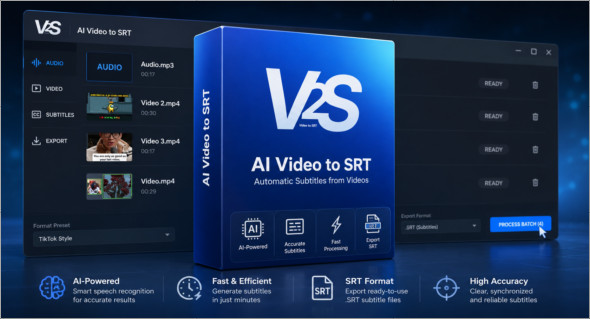
AI Video to SRT is an advanced automatic transcription solution designed to convert your video and audio files into professional subtitles in minutes, without an internet connection or cloud data transfer. Thanks to powerful local artificial intelligence, the application guarantees complete privacy while delivering remarkable accuracy in generating SRT, VTT, and TXT files.
In a world where video dominates the web—YouTube, online courses, social media, corporate communications—subtitles are no longer an option, but a necessity. They improve accessibility, increase viewing time, and optimize the search engine ranking (SEO) of video content. AI Video to SRT addresses these needs precisely by offering a powerful, fast, and secure tool.
Total confidentiality: no uploads to the cloud
Unlike many online platforms that require files to be sent to remote servers, AI Video to SRT works entirely offline.
This means:
- No data leaks
- No external storage
- No monthly subscription
- No risk associated with third-party servers
Your videos remain on your computer. This approach is ideal for journalists, businesses, creators of confidential content, or professionals handling sensitive data.
Advanced local artificial intelligence
The software uses local AI technology capable of analyzing audio tracks with high precision. The algorithm identifies speech, automatically segments sentences, and synchronizes subtitles with the exact timecodes.
Result :
- Accurate subtitles
- Automatic synchronization
- Significant time savings
No more spending hours manually adjusting each line.
NVIDIA GPU acceleration for exceptional performance
AI Video to SRT supports NVIDIA GPU acceleration, enabling significantly faster processing speeds on compatible machines.
Users with an NVIDIA graphics card benefit from:
- From a faster transcription
- Smooth processing even for long files
- A significant productivity gain
Extensive compatibility with video and audio formats
The tool supports the most common formats:
- MP4
- MOV
- MKV
- MP3
- WAV
- M4A
No prior conversion is necessary. Simply import your file and start the transcription.
Professional multi-format export
Once the transcription is complete, you can export your subtitles in various standard formats:
- .SRT – Universal format for most video players
- Mountain biking – Ideal for web and HTML5
- .TXT – Raw text for proofreading or editing
These formats are compatible with major video streaming platforms and editing software.
TikTok Style Mode – Dynamic word-by-word subtitles
For creators of short content (Reels, Shorts, TikTok), AI Video to SRT offers a special preset displaying subtitles word by word with a dynamic effect.
This style greatly increases engagement on social media and improves understanding of the message.
Built-in coarseness filter
The language filter automatically censors inappropriate words in transcripts. An ideal feature for:
- Educational content
- Companies
- Creators wishing to maintain a professional image
Batch Queue Processing
Do you have several files to process?
The queuing system allows a series of transcriptions to be launched automatically, one after the other.
A major asset for production studios and prolific creators.
Modern and customizable interface
AI Video to SRT offers:
- Light Mode
- Dark Mode
An ergonomic interface designed for comfortable extended use.
Alternative: CineTranslate
There is also an alternative called CineTranslate, available in a portable version.
More information here:
https://www.trucnet.com/cinetranslate-portable/
However, AI Video to SRT stands out with its 100 % local processing, NVIDIA GPU acceleration, and advanced features tailored to modern creators.
Why choose AI Video to SRT?
Secure offline transcription
No subscription
GPU Acceleration
Multi-format export
Supports many video/audio formats
An ideal tool for creators, businesses and editors
AI Video to SRT is a complete solution for anyone who wants to generate accurate, fast, and secure subtitles without relying on a cloud service. It combines performance, privacy, and ease of use in software optimized for both professionals and independent creators.
Version : 1.1.5
Language : English
Size : 1.55 Go /Portable: 2.65 Go
Configuration:
– Windows (x64 Bits): 10, 11
Download AI Video to SRT v1.1.5
Download AI Video to SRT Portable v1.1.5
Cet article a été mis à jour le 25 August 2026