
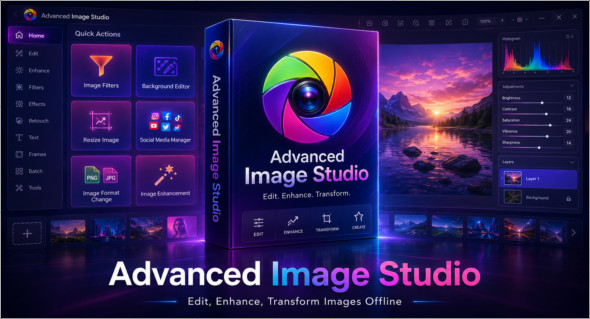
Advanced Image Studio is an all-in-one desktop application designed to enhance, edit, and transform images directly on your computer. It brings together several essential tools in a single interface for quickly working on your visuals: background removal, background replacement, automatic enhancement, noise reduction, smart sharpening, image filters, custom resizing, and format conversion. Thanks to its entirely local operation, it allows you to process images without relying on an online service or cloud processing, offering greater privacy, speed, and control.
This program is aimed at content creators, webmasters, designers, bloggers, and users who want to prepare clean images for social media, create Windows icons, or optimize visuals for their projects. Advanced Image Studio offers easy handling with drag-and-drop functionality, instant previews, and a side-by-side comparison between the original and modified images. Note that there is also CyberLink PhotoDirector Ultra, available here: https://www.trucnet.com/cyberlink-photodirector-ultra/
Key features of Advanced Image Studio
Background editing suite : quickly remove the background from an image, replace it with another image, apply a solid color or add a light to intense blur for a more professional result.
Image enhancement tools : Enhance your photos with Auto Enhance, Noise Reduction, Auto White Balance and Smart Sharpen to obtain sharper, cleaner and more balanced visuals.
Filters and manual settings : Easily adjust brightness, contrast, vibrance, sharpness and warm or cool tones using simple sliders.
Custom resizing : modify the width and height of your images according to your needs, whether for a website, an article, a thumbnail or a social post.
Social media presets : Quickly prepare your images for Instagram, Facebook, YouTube and LinkedIn with suitable formats.
Format conversion : Convert your images between PNG, JPEG and BMP formats according to the desired use.
Icon Generator : create Windows .ICO files in several standard sizes, convenient for software, shortcuts or custom projects.
Drag and drop and side-by-side preview : upload your files quickly and compare the original image with the final result in real time.
Summary
In summary, Advanced Image Studio is a complete solution for editing, enhancing, resizing, and converting images offline. With its background removal tools, enhancement filters, social presets, and icon generator, it offers a convenient, fast, and secure experience for anyone who wants to manage their visuals from a single application.
Version : 1.1.3 Pro
Language : English
Size : 220.75 MB / Laptop: 224.38 MB
Configuration:
– Windows (x64 Bits): 10, 11
Download Advanced Image Studio v1.0.1
Download Advanced Image Studio Portable v1.0.1
This article was last updated on June 1, 2026