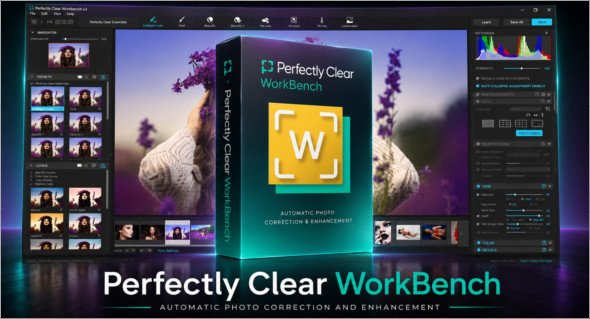
Perfectly Clear WorkBench is a professional image correction and enhancement software designed to accelerate photo processing while maintaining natural and accurate results. It allows you to apply intelligent automatic corrections, manually adjust essential parameters, and create custom presets for consistent results across multiple images. With its advanced correction engine, it can improve exposure, color, contrast, sharpness, skin tones, and the overall appearance of photos in just a few clicks.
With its modern interface, Perfectly Clear WorkBench is aimed at photographers, retouchers, content creators, and users who want to quickly optimize their images without going through a complex workflow. The software offers retouching tools, AI templates, automatic scenes, creative filters, before/after comparison, and convenient features for applying the same settings to multiple files. You can also see Advanced Image Studio : https://www.trucnet.com/advanced-image-studio/
Key features of Perfectly Clear WorkBench
Intelligent autocorrect Perfectly Clear WorkBench analyzes images and applies automatic enhancements to correct light, color, sharpness, contrast, and detail.
AI models and automated scenes The software offers various templates adapted to different types of images, such as portraits, professional photos, school photos, sports photos, or tourist photos. The detected scenes allow for corrections to be applied that are more appropriate to the content.
Custom presets : the user can create, modify and save their own presets in order to quickly find a specific correction style and apply it to other images.
Face retouching and enhancement : Perfectly Clear WorkBench includes facial detection tools, with support for facial landmarks, smile correction, closed eyes, skin tones and certain visible defects.
Creative filters and advanced corrections The program offers numerous creative filters, adjustments to color, brightness, temperature, saturation, as well as tools like Auto Crop, red-eye reduction, and sharpness enhancement.
Batch processing : the Sync All and Sync Forward functions allow you to quickly apply the same corrections to multiple images, which is very useful for photo series.
Clear and productive interface : the workspace includes a main display area, zoom options, before/after comparison, Simple and Edit modes, as well as dedicated panels for AI models, scenes, presets and corrections.
Conclusion
In conclusion, Perfectly Clear Workbench is a powerful solution for automatically enhancing photos, creating custom presets, and accelerating the editing workflow. With its AI models, advanced correction tools, face retouching, and batch processing, it's ideal for users looking for fast, accurate, and professional software to optimize their images.
Version : 5.1.1.3229
Language : Multilingual (French included)
Size : 248.87 MB / Laptop: 345.63 MB
Configuration:
– Windows (x64 Bits): 10, 11
Download Perfectly Clear WorkBench v5.1.1.3229
Download Perfectly Clear WorkBench Portable v5.1.1.3229
This article was updated on June 2, 2026