Screenshot Reader creates copies of images that can be easily cut and pasted from your Clipboard into Microsoft PowerPoint, Word, Excel, or graphic files.
More than just a screen capture software, you can use Screenshot Reader to select and copy text elements from images, Flash files, PDFs and other image-based files, then convert them into true text that can be edited or inserted into another document.
Need an assistant for your daily office work?
Then ABBYY Screenshot Reader is for you.
Indeed, this allows you to transform all the content of the captured image into editable formats without having to rewrite it.
Take two types of screenshots: picture And text:
Traditional screen capture software takes an image of a program window or a selected area of a user's computer desktop.
With ABBYY Screenshot Reader, you can choose to take "traditional screenshots" of your desktop application, website, presentation,
area of a document, etc. or to convert the text in graphic files into editable text and create "text screenshots".
Image screenshots:
Easily create screenshots and save them as images that you can share with your friends or use in presentations, training materials, and various other documents.
You can capture a selected area on the screen, an entire window, or the entire desktop.
The advanced Timed Screen function even allows you to take a screenshot within 5 seconds so that you can "prepare" the screen, open the necessary menus when preparing software documentation, for example.
Screenshots of text:
Do you want to capture text from an image file, website, presentation, or PDF file?
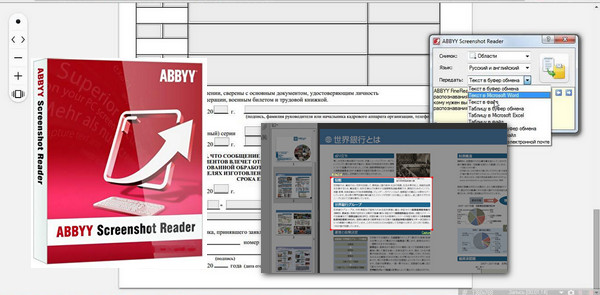
You can quickly convert these text images into truly editable text that you can paste directly into an open application, edit, or save as Microsoft Word or Excel documents. Screenshot Reader converts the screenshot image into text.
Easy to use with practical tools:
Taking a screenshot is a simple task thanks to the convenient tools of Screenshot Reader.
The program's main screen allows you to choose a screenshot area and an output format.
Screenshot Reader can be configured to run automatically at startup so that it is always available.
Variety of recording formats:
Screenshots can be used for different tasks or you may need them in various recording formats.
ABBYY Screenshot Reader allows you to save image screenshots in JPEG, Bitmap or PNG format.
Text screenshots can be saved as editable text in .RTF, .TXT, .DOC or .XLS format.
Advantages of ABBYY's OCR technology:
Screenshot Reader is based on ABBYY's award-winning OCR technology, which has been developed over the past 20 years.
This technology is part of professional OCR and PDF conversion software such as ABBYY FineReader, which allows for the conversion of paper documents and images into editable electronic formats with superior accuracy and preservation of layout.
Configuration:
– Windows (x32/x64 Bits): XP, Vista, 7, 8, 8.1, 10
– Processor: 3GHz
– RAM: 512 MB
– Disk space: 500 MB
Facility :
1. Open the "Folder ScreenshotReader – Setup" .
2. Install the program by launching the file " Setup.exe" .
- Language : Multilingual (French included)
- Size : 240 MB
This article was updated on December 22, 2016