USB Device Tree Viewer is a small utility that allows you to examine the tree of USB drivers connected to your PC.
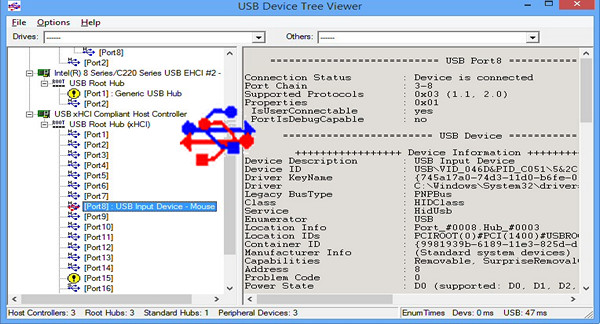
When you launch USB Device Tree Viewer, you'll notice that the interface is divided into two parts. On the left, you'll see the tree view of USB ports and devices connected to your computer. The right-hand panel provides information about the drivers detected by the system, including a description, storage capacity, and statistics for each device.
Finally, by right-clicking on each entry, you'll see a drop-down menu that provides access to more options. These include restarting a driver, accessing device properties, and performing a safe disconnection.
Configuration:
– Windows (x32/x64 Bits): XP, Vista, 7, 8, 8.1, 10
– Processor: 1GHz
– RAM: 128 MB
– Disk space: 1 MB
Facility :
None! They're portable versions!
– For 64-bit Windows, run x64\UsbTreeView.exe
– For 32-bit Windows, run Win32\UsbTreeView.exe
- Language : English
- Size : 0.7 MB
This article was updated on December 23, 2016