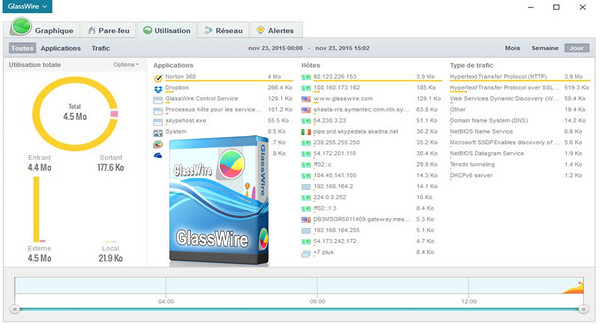
Software that allows monitoring of Internet traffic, application of firewall rules and detection of applications with suspicious behavior.
This allows users to view incoming and outgoing internet traffic and traffic for each application. Users can then view a history of the last 5 minutes, the previous week, or the previous month. The software also provides a detailed overview of bandwidth usage by application, host, and traffic type.
GlassWire also has good firewall features, allowing you to monitor the bandwidth usage of each process and block it if necessary. Alerts notify you of the first network activity of an application, providing detailed information about the IP address and host location.
Featuring an attractive, simple interface and available in French, GlassWire allows for clear visualization of bandwidth and rapid detection of suspicious applications.
This software is also available in three paid versions, Basic, Pro and Elite, including features such as multi-PC management, and specific tools for Wi-Fi, microphone and webcam.
Configuration:
– Windows (x32/x64 Bits): XP, Vista, 7, 8, 8.1, 10
– Processor: Pentium 4 3GHz
– RAM: 512 MB
– Disk space: 30 MB
Facility :
1. Perform the normal installation via GlassWireSetup.exe
* Do not launch the software
2. Copy/Overwrite folder files Hook_URET in the installation folder
- Language : Multilingual
- Size : 29.9 MB
This article was updated on January 1, 2017