You have a problem with the blue screen of death (Blue Screen of Death) on Windows (XP, Seven, 8 or 10)? Do you want to repair your machine And get rid of this boring Blue screen ?
L'screen blue of death also shortened BSoD refers to the screen displayed by the operating system Windows when it can no longer recover from a system error or when it is at a critical point of fatal error.
What are the causes of the blue screen?
Generally, a blue screen appearing on a Windows computer indicates a problem with your computer, the origin of which can be varied:
A attack which can remove or alter a driver. It's difficult to detect the pilot malfunctionThat's why the best solution is to reinstall all your device drivers.
2. Related problem has the use of software
The problem may simply be related to thesoftware installation that it may be either malicious or to a incorrect settingsThe solution is to uninstall it or revert to the default settings with a system restore.
3. Problem related to processor power
This is the case of overclockingWhen you launch programs and applications that demand too many resources, the processor heats up more than normal, and suddenly your PC crashes, showing you a nice blue screen.
To fix this, check that your processor doesn't have any problems with the cooling your computer and control the CPU fan rotation.
4. Problem related to the use of a device
If the The device is incompatible with your system configuration.Then updating this device may solve the problem.
5. Problem related to a Hard Drive failure:
Start your computer in recovery console mode and test your disks. If you find that the problem is disk-related, then try formatting it.
Diagnose and identify the driver causing the crash
BlueScreenView is a small, free tool that allows you to, in the event that Windows crashes with a blue screen,Identify the driver that caused the crash..
BlueScreenView It requires no installation; you can use it. in safe mode if the blue screen appears before Windows starts.
Noticed:
The application can only work if your PC has already experienced at least one crash and is configured to generate minidumps (an active mode by default).
To use it, simply follow these steps:
- Download the BlueScreenView software and extract the archive.
- After a blue screen crash under Windows, Launch the program. To identify the cause of the crash (under Windows 7/Windows 8, remember to right-click and select Run as administrator).
- The utility will automatically detect the list of minidumps located on the Windows hard drive. Each DUMP is accompanied by the date/time of the crash (Crash Time), the error that caused the crash (Bug Check String), diagnostic codes and parameters, the driver that caused the crash (Caused by Driver) and other useful information.
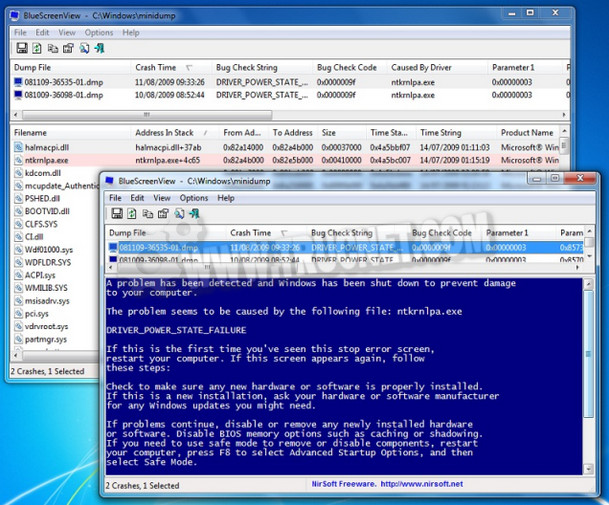
- As the image above shows: the majority of cases of computer crash are caused by the drivers, so to correct these problems, it will be necessary to update these drivers from the publisher's website or to permanently delete them and reinstall them.
- Finally, the error messages that appear can also help you find the problem and the solution.
And if you're lazy like me and diagnosing and identifying the cause of the blue screen is a problem for you, then you can opt for the software PC Health Advisor who will take care of solving your blue screen problem.
PC Health Advisor is a paid program which allows you to fix all blue screen errors with a simple and easy-to-use interface.
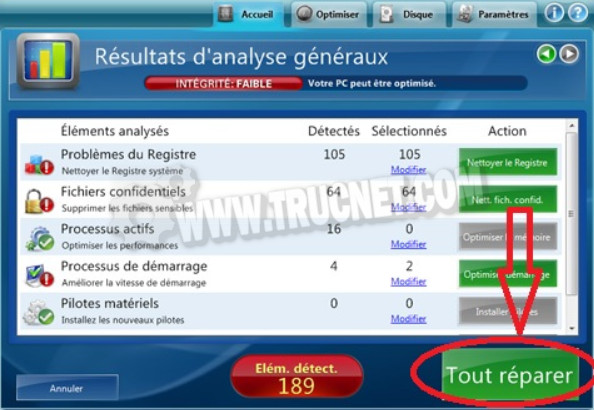
After installing the program, click on "Start Scan". The software will diagnose blue screen problems on your computer. Finally Click on repair all.
This article was updated on August 10, 2021