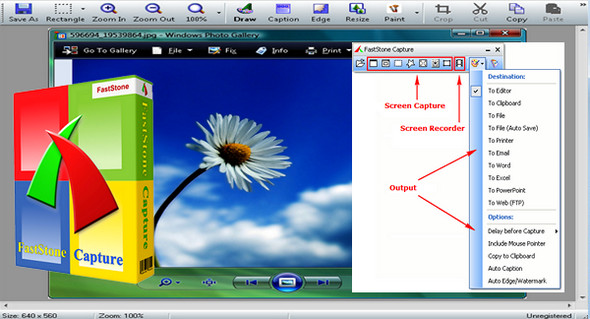
FastStone Capture is a no-frills but highly effective screen capture manager. The software is presented as a floating box containing four icons.
With just a few clicks, you can capture a selected image, the entire screen, a web page, etc. The application also has image editing tools such as cropping, resizing, emailing, adding comments, printing, and many other complementary features.
Captured images can be copied to the clipboard, saved to disk, or viewed with the software, which also functions as a quick viewer. You can open an image folder, add it to your favorites, or drag and drop images onto the interface's eye icon. The mouse wheel can then scroll through the selected images.
This software is easy to use. Its graphical interface is simple, intuitive and user-friendly.
Configuration:
– Windows (x32/x64 Bits): XP, Vista, 7, 8, 8.1, 10
– Processor: 1 GHz
– RAM: 512 MB
– Disk space: 30 MB
Facility :
1. Install the Program FSCaptureSetup84_Fr.exe
2. Tab Help
3. Enter Registration code (Use the keygen included)
Portable Version (Pre-activated)
1. Launch FSCapture.exe
Language : French
Size : 13.4 MB
This article was updated on February 21, 2017