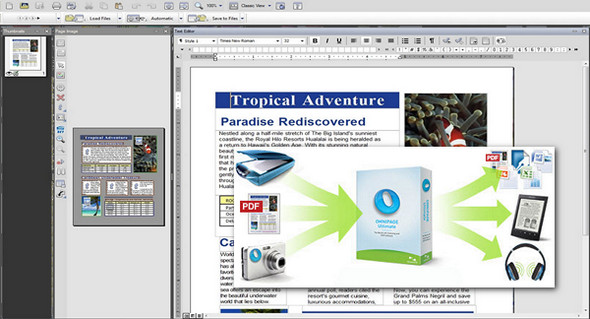
OmniPage 19 is the world's most accurate document conversion software. With a recognition level exceeding 99% (%), it transforms all your paper documents and PDFs into easy-to-edit, view, and distribute electronic files in the format of your choice. Without touching your keyboard, you get perfectly formatted documents in seconds!
The exceptional accuracy of the formatting of converted documents saves time and money by radically optimizing the processing, archiving, and sharing of both paper documents and digital files. The result? Unparalleled ease of use, automated task processing, readily accessible information, and increased productivity!
Images from a digital camera or iPhone can be converted into editable files in the format of your PC applications, and your paper documents can be scanned and then converted into e-books that will follow you everywhere you go.
OmniPage now integrates Nuance's most powerful text-to-speech engine to allow you to listen to all your documents on your iPhone, iPad, Android device or any other device capable of playing MP3 files.
Precision functions
Improved OCR accuracy
Optimized OCR engines offer unparalleled recognition accuracy for the conversion and archiving of strategic documents.
Unparalleled formatting preservation
Once converted, your documents are identical in every way to the originals and just as easy to edit: columns, tables, bulleted lists and graphs included.
Capture documents at any time
Use your digital camera or iPhone® to capture text. Convert your document photos to text in record time with Nuance's cutting-edge 3D Correction technology.
Compatible with all scanners
Any device capable of scanning can work with OmniPage! Optimize the productivity and accuracy of your mobile scanners, desktop scanners, and multifunction printers with OmniPage.
Compatible with all your favorite apps
OmniPage offers the largest number of output file formats, including PDF, HTML, Corel® WordPerfect®, Microsoft® Word, Excel®, PowerPoint® (pptx), ePub and many more!
Conversion from online storage sites
Process documents directly from Windows Live SkyDrive, Google Drive, Evernote, Dropbox, and many more. Includes Nuance Cloud Connector, powered by Gladinet.
Batch processing = time saved
Schedule batch processing of large volumes of files from your folders or email for automatic, real-time conversion of received files.
Form processing
Convert your paper forms into forms that can be filled out and distributed electronically. OmniPage can collect data from PDF or paper forms and export it to a spreadsheet or database.
Built-in redaction and highlighting tools
Redact (blacken) confidential data or highlight important information. During recognition, OmniPage can automatically "mark" your text based on a list of keywords.
Recognition of over 120 languages
Process, edit and store your documents anywhere in the world! OmniPage can recognize documents written in languages using the Latin, Greek and Cyrillic alphabets, as well as in Chinese, Japanese and Korean.
New features:
* Improved accuracy on digital photos and better preservation of layouts
* OmniPage Launch Center
* OmniPage DocuDirect
* Digitization and distribution of documents in shared Microsoft Server environments
* Efficient and accurate conversion to searchable PDF
* Be mobile! Listen to your documents with ultra-realistic speech synthesis.
* Find your documents on your e-reader
* Improved support for PDF/A format, for reliable archives
Configuration:
– Windows (x32/x64 Bits): XP, Vista, 7, 8, 8.1, 10
– Processor: 1 GHz
– RAM: 1 GB
– Disk space: 5 GB
Facility :
1. Install the software (mount the ISO file) smr-opu-191.iso (via a virtual reader)
2. Use the keygen for activation
Language Multilingual (French included)
Size : 3.0 GB
This article was updated on January 23, 2021