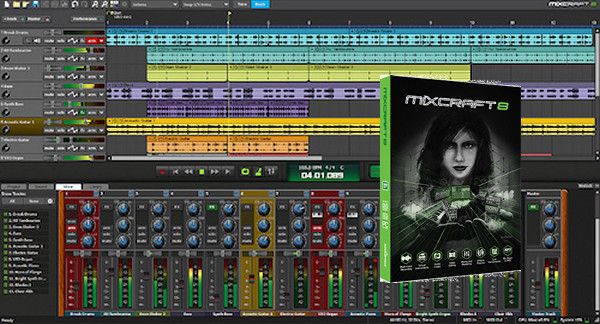
Mixcraft is an audio management software that allows you to create professional audio mixes accessible to everyone, transforming your PC into a production studio. It features a simple interface with numerous functionalities and can be connected to various accessories: MIDI keyboard, guitar, microphone, mixing console, etc.
Loops
Mixcraft's massive collection of studio-quality loops is organized into song kits, making track creation incredibly easy—no musical training required! Over 7,500 loops, music beds, sound effects, and samples enable fast and easy professional music production. Put the finishing touches on videos or ambient compositions with our comprehensive collection of sound effects and music beds. Enhanced sound navigation allows for quick audition and sound selection. The Favorites star provides quick access to frequently used sounds. Continuously expand your sonic palette with built-in browsing and importing capabilities from Freesound.org.
Mixcraft 8-piece kits
Mixcraft includes over 7,500 loops, sound effects, and samples. All loops automatically adapt to your project key and tempo. Use these kits to create backing tracks or entire songs. Styles include Rock, Blues, Country, Reggae, Dance, Disco, Metal, Hip Hop, Acoustic Rock, Latin Rock, Modern Rock, Jazz, Dub, Electronica, Techno, Dance, House, Rhythm & Blues, Orchestral, Celtic, Funk, and more.
Live Performance
Home Rock is automatically synced, non-stop audio and MIDI clip grooves using the surprisingly flexible Performance Panel. Create mixes and mashups with audio warping and track slicing. Manipulate the Performance Panel with a Novation Launchpad, MIDI controller, or even your computer keyboard, and watch Mixcraft's powerful virtual instruments unfold. Record loops directly to the Performance Panel grid slots to instantly create layered, looping performances.
MIDI Scoring and Editing
It's never been easier to compose your own beats, patterns, and sheet music. Create custom rhythms and musical motifs at lightning speed using the fun and creative step sequencer. Create and edit performances with the powerful piano roll editor. Use the notation editor to write, view, publish, and print professional-quality sheet music.
Instruments and effects
Prepare for a plethora of virtual instruments, including emulations of classic synthesizers, rock organs, and electric pianos. Create your own beats and sounds with the new Omni and Alpha Samplers that redefine ease of use. Master your tracks with a huge array of outstanding professional effects. Mixcraft 8 Pro Studio is packed with over 1250 additional plug-ins, including Melodyne Essentials, Celemony's amazing pitch correction, and the Editing Suite, which goes beyond the plug-in realm with full integration into the Mixcraft audio editor window.
Video editing
Mixcraft is more than just a blockbuster DAW – it's also a professional, feature-rich editing and notation environment. Easily load and edit video files and still images. Transfer video clips, create transitions, and add a professional touch with fantastic video effects. Quickly create slideshows from photo collections. Add titles and scrolling text. Publishing allows you to render, upload, and promote music and video projects directly to social media sites such as YouTube, Vimeo, Facebook, SoundCloud, and more! Mixcraft 8 now supports MP4 audio and video in addition to WMV and AVI formats.
Mixing and Mastering
View and edit multiple parameters simultaneously with powerful automation and clip-based automation. Use any MIDI hardware controller to automate and record dozens of mixer parameters, virtual instruments, and effects. Mixcraft offers support for a wide range of hardware control surfaces, including Mackie Control compatible hardware, Novation Launchpad, and the exclusive Acoustica Mixcraft Remote mobile app. Once your masterpiece is complete, easily publish the mix in your preferred format or burn it directly to an audio CD!
Configuration:
– Windows (x32/x64 Bits): XP, Vista, 7, 8, 8.1, 10
– Processor: 1.8 GHz Dual Core
– RAM: 2 GB
– Disk space: 1 GB
Facility :
1. Install mixcraft8-b368-setup.exe Do not perform the update!
– Do not run Mixcraft!
2. Copy/paste the .dll from the file Crack » instead of:
-Win x64 C:\Program Files\Acoustica Mixcraft 8
-Win x32 C:\Program Files (x86)\Acoustica Mixcraft 8
- Language : Multilingual (French included)
- Size : 239.7 MB
This article was updated on January 23, 2017