The Acronis True Image WD edition is a special version that allows you to clone disks, back up the operating system, applications, settings, and all your data. You can also use Acronis cyber protect home office.
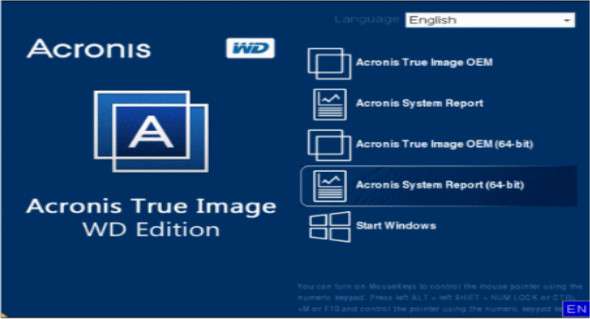
The Rescue Media Builder tool lets you create a bootable rescue media (CD, USB drive, ISO file) with Acronis True Image WD Edition. This allows you to run Acronis True Image from this rescue media on a non-functional system or a computer that cannot boot normally. Furthermore, you can even back up disks on a non-Windows computer by copying all the data using sector-by-sector disk imaging. For this, you will need a bootable media containing a standalone version of Acronis True Image.
Acronis True Image WD Edition is compatible with HDD and SSD hard drives and can be installed on Windows 7, Windows 8.1, Windows 10, and Windows 11 operating systems. Note that you must have at least one WD/Western Digital (or SanDisk) drive connected to your system to install and run this software.
Key features of Acronis True Image WD Edition:
– Cloning hard drives, which allows you to create an identical copy of one drive onto another
– Back up the entire operating system, including files, folders, partitions and settings.
– Complete recovery to restore your system and data
– Secure deletion functionality
– Create a bootable rescue medium
Version : 27.0.1.39676
Language : Multilingual (French included)
Size : 739.76 MB
Configuration:
– Windows (x32/x64 Bits): 7, 8, 8.1, 10, 11
Acronis True Image WD Edition v27.0.1.39676
This article was updated on May 21, 2023