When you're browsing Facebook, you sometimes like to be discreet. Maybe because you don't always have time to reply to messages instantly.
But how can you avoid replying if the chat constantly displays your last seen date? Even when you log off everywhere (web, Facebook mobile, Messenger), it still shows up for your friends. Don't worry, there's a trick to remove your last seen date once and for all. To do this, you must always log in on a computer and delete the Facebook and Messenger apps from your smartphone.
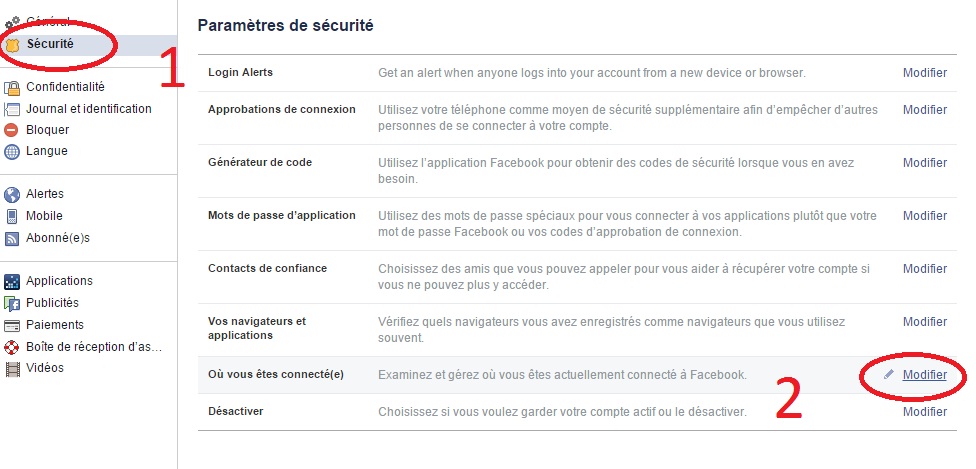
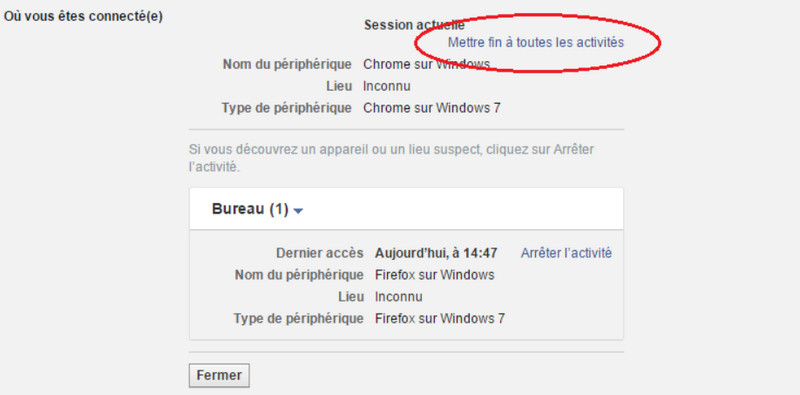
Next, you need to delete your active sessions by clicking on settings. Account > Security > Where you are logged in.
And click on "End all activities".
By following this method, the little phone symbol will disappear (the one that appears next to your name) and your last connection on Facebook will therefore be revealed at the minute during which you deleted the application from your mobile.
This article was updated on January 10, 2016