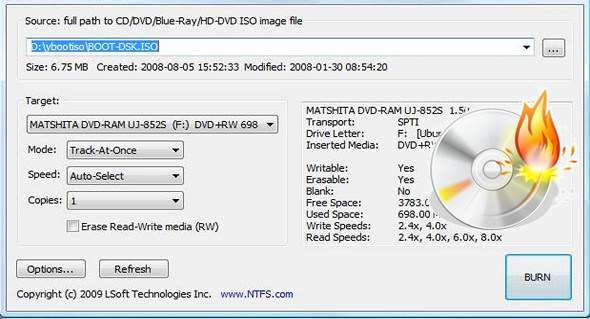
Active @ ISO Burner allows burning ISO images of CDs/DVDs/Blu-rays compatible with the ISO 9660 standard. Automated burning is also supported.
Burning ISO and IMG images is possible on various media: CD-R, DVD-R, DVD+R, CD-RW, DVD-RW, DL DVD+RW, HD DVD and Blu-ray discs.
In terms of usage, it couldn't be simpler or more straightforward. Just launch the executable from your desktop or a USB drive, select the disk image, insert your disk, and click the Burn ISO button.
Features:
– New! Revised and improved user interface
– New! New, more compact installation program
– Many more CD/DVD/BD formats supported, as well as fewer burning errors
– Three independent transport options are supported (SPTI, ASPI, SPTD)
– Extensive information about devices, media, and ISO files is displayed
New features:
* Works under the user's account (via SPTI on Vista and SPTD transports)
* The burning method (CAT, SAO, DAO) and the number of copies to burn can be specified automatically.
* The full text log with actions performed, errors, and progress information is displayed
* Configuration of supported afterburner actions: Check, Eject, Shut Down PC
* Engraving mode test is supported
Configuration:
– Windows (x32/x64 Bits): XP, Vista, 7, 8, 8.1, 10
– Processor: 1 GHz
– RAM: 512 MB
– Disk space: 1 GB
Facility :
Standard installation, launch the file ISOBurner-Setup_4.0.3.exe
Portable version
Run the portable file\IsoBurner.exe
Language : English
Size : 5.2 MB
This article was updated on March 22, 2017