VbsEdit creates scripts for application development. It has a simple and well-organized interface and all the necessary tools for launching new software.
Main features
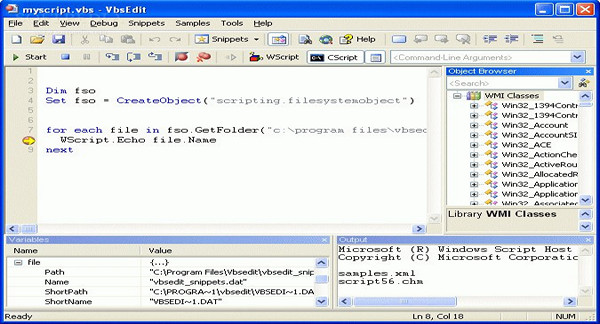
The main interface of VbsEdit includes a console where the user can create and edit code. It displays line numbers and highlights the syntax used for each language in a different color.
This utility also offers a collection of predefined scripts that can be used simply by selecting them. The software allows you to run the entered scripts. It offers a step-by-step execution mode to see how each line of code works. It indicates lines containing errors, the corrections for which can be found in the help option.
VbsEdit allows for different types of files depending on the user's needs. For example, it offers executable files provided as finished software or WMI code compatible with other programming software for enhancement.
Configuration:
– Windows (x32/x64 Bits): XP, Vista, 7, 8, 8.1
– Processor: 3GHz
– RAM: 512 MB
– Disk space: 20 MB
Facility :
1. Install vbsedit.exe
2. Use the AMPED keygen\vbs_keygen.exe
- Language : English
- Size : 15.4 MB
This article was updated on December 24, 2016