Nothing's worse than hearing your computer constantly running its fan! To fix this, you have two free solutions:
Dust your PC using a can of compressed air or a compressor.
Use software to control fan speed and reduce fan noise
First, dust your computer, including the heatsinks and fans in your tower or laptop. Very important: remember to hold your fans when using the compressed air to avoid damaging them.
Next, if the fans are still running just as fast despite cleaning your PC, you can use software to adjust the fan speed from your computer. This very powerful software is an essential addition to your software toolkit; it's called "SpeedFAN".
The software can be downloaded from the next site.
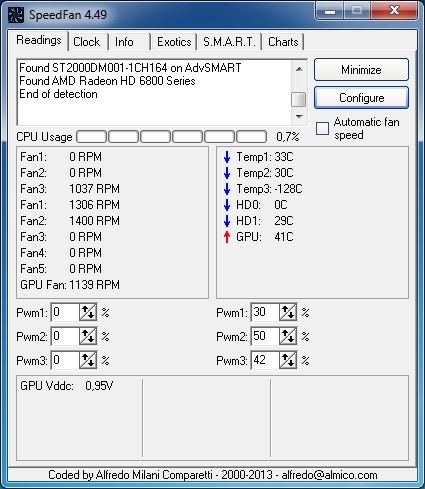
As you can see in the screenshot above, "SpeedFAN" allows you to adjust the CPU fan speed (and other fans) of your computer or laptop as a percentage. Apply your changes and be sure to monitor the fan speed in revolutions per minute (RPM) after each modification.
This software fan speed control This is very practical but can be very dangerous if you reduce the fan speed too much. Therefore, be careful to make precise adjustments in this area to avoid burning out or damaging your computer's components.
This article was updated on December 22, 2015