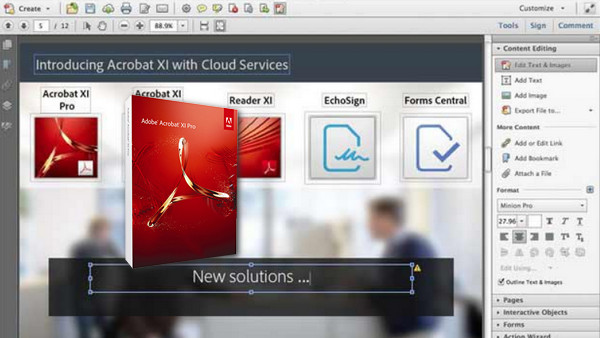
Adobe® Acrobat® XI Pro is not only the best PDF converter on the market. It is also packed with intelligent tools that multiply communication possibilities — with ease, transparency, and brilliance.
Adobe Acrobat XI Pro allows you to:
– Edit PDF documents
– Create and analyze forms
– Generate PDF files
– Merge and combine files
– Simplify revisions and approvals
– Protect PDF files
– Standardize file preparation
– Benefit from new cloud-based services
Stop re-entering the content of PDF files. Convert the documents
Convert PDFs to native Microsoft Office files to save time and preserve both fonts and formatting. Edit text and images directly within your PDF file.
Make minor edits to the text and images in your PDFs without needing the original document. Speed up form creation and response collection.
Create PDF or web forms in minutes using drag and drop. Then, publish them online to simplify distribution, as well as the collection and analysis of responses.
Share flawless documents in all circumstances. Combine and merge files to improve communication. Group multiple documents into a structured PDF file to simplify emailing and searching within the content.
Simplify your review and validation processes
Collect feedback faster with group reviews that allow everyone to view and use each other's annotations.
Easily protect PDF files. Systematically protect confidential documents. No knowledge of security technologies is required.
Prepare your compliant files in the same way. Automate the creation of compliant PDF documents without ever missing a step.
Configuration:
– Windows (32/64 Bits): XP Sp3 /Vista /7 /8 /8.1 /10
– 1.3 GHz or faster processor
– 512 MB of RAM (1 GB recommended)
– 1.85 GB of available disk space
– Internet Explorer 7, 8, 9 or 10, Firefox Extended Support Release, Chrome
Facility :
0. Close the internet connection.
For a clean installation:
1. Uninstall the old version with: « AdbeArCleaner_v2 »
2. Open the folder (Adobe Acrobat XI) and then run: Setup.exe
– Choose the language.
– Check: “Use the trial version…”
3. Close the program at the end of the installation.
4. Install the update: AcrobatUpd11018.msp »
5. Copy and paste " amtlib.dll » in the program's installation folder:
C:\Program Files (x86)\Adobe\Acrobat 11.0\Acrobat
6. Add this to hosts file in: (C:\Windows\system32\drivers\etc\host)
127.0.0.1 209.34.83.73:443
127.0.0.1 209.34.83.73:43
127.0.0.1 209.34.83.73
127.0.0.1 209.34.83.67:443
127.0.0.1 209.34.83.67:43
127.0.0.1 209.34.83.67
127.0.0.1 ood.opsource.net
127.0.0.1 199.7.52.190:80
127.0.0.1 199.7.52.190
127.0.0.1 OCSP.SPO1.VERISIGN.COM
127.0.0.1 199.7.54.72:80
127.0.0.1 199.7.54.72
127.0.0.1 192.150.14.69
127.0.0.1 192.150.18.101
127.0.0.1 192.150.18.108
127.0.0.1 192.150.22.40
127.0.0.1 192.150.8.100
127.0.0.1 192.150.8.118
127.0.0.1 209-34-83-73.ood.opsource.net
127.0.0.1 3dns-1.adobe.com
127.0.0.1 3dns-2.adobe.com
127.0.0.1 3dns-2.adobe.com
127.0.0.1 3dns-3.adobe.com
127.0.0.1 3dns-3.adobe.com
127.0.0.1 3dns-4.adobe.com
127.0.0.1 3dns.adobe.com
127.0.0.1 activate-sea.adobe.com
127.0.0.1 activate-sea.adobe.com
127.0.0.1 activate-sjc0.adobe.com
127.0.0.1 activate-sjc0.adobe.com
127.0.0.1 activate.adobe.com
127.0.0.1 activate.adobe.com
127.0.0.1 activate.wip.adobe.com
127.0.0.1 activate.wip1.adobe.com
127.0.0.1 activate.wip2.adobe.com
127.0.0.1 activate.wip3.adobe.com
127.0.0.1 activate.wip3.adobe.com
127.0.0.1 activate.wip4.adobe.com
127.0.0.1 adobe-dns-1.adobe.com
127.0.0.1 adobe-dns-2.adobe.com
127.0.0.1 adobe-dns-2.adobe.com
127.0.0.1 adobe-dns-3.adobe.com
127.0.0.1 adobe-dns-3.adobe.com
127.0.0.1 adobe-dns-4.adobe.com
127.0.0.1 adobe-dns.adobe.com
127.0.0.1 adobe-dns.adobe.com
127.0.0.1 adobe.activate.com
127.0.0.1 adobeereg.com
127.0.0.1 crl.verisign.net
127.0.0.1 CRL.VERISIGN.NET.*
127.0.0.1 ereg.adobe.com
127.0.0.1 ereg.adobe.com
127.0.0.1 ereg.wip.adobe.com
127.0.0.1 ereg.wip1.adobe.com
127.0.0.1 ereg.wip2.adobe.com
127.0.0.1 ereg.wip3.adobe.com
127.0.0.1 ereg.wip3.adobe.com
127.0.0.1 ereg.wip4.adobe.com
127.0.0.1 hl2rcv.adobe.com
127.0.0.1 ood.opsource.net
127.0.0.1 practivate.adobe
127.0.0.1 practivate.adobe.*
127.0.0.1 practivate.adobe.com
127.0.0.1 practivate.adobe.com
127.0.0.1 practivate.adobe.ipp
127.0.0.1 practivate.adobe.newoa
127.0.0.1 practivate.adobe.ntp
127.0.0.1 tss-geotrust-crl.thawte.com
127.0.0.1 wip.adobe.com
127.0.0.1 wip1.adobe.com
127.0.0.1 wip2.adobe.com
127.0.0.1 wip3.adobe.com
127.0.0.1 wip3.adobe.com
127.0.0.1 wip4.adobe.com
127.0.0.1 wwis-dubc1-vip60.adobe.com
127.0.0.1 wwis-dubc1-vip60.adobe.com
127.0.0.1 wwis-dubc1-vip60.adobe.com
127.0.0.1 www.adobeereg.com
127.0.0.1 www.wip.adobe.com
127.0.0.1 www.wip1.adobe.com
127.0.0.1 www.wip2.adobe.com
127.0.0.1 www.wip3.adobe.com
127.0.0.1 www.wip4.adobe.com
127.0.0.1 lmlicenses.wip4.adobe.com
127.0.0.1 lm.licenses.adobe.com
- Language: Multilingual (French included)
- Size: 777.4 MB
This article was updated on December 13, 2018