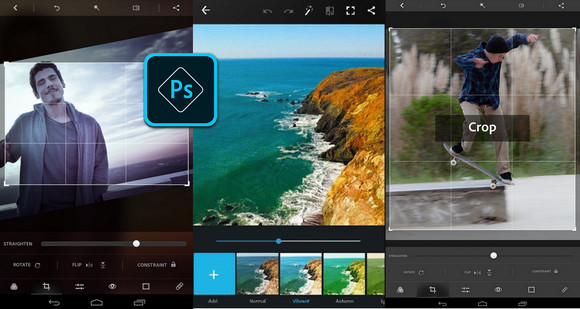
Editing photos on the go has never been so fun, fast, and cool. Touch up your photos with automatic corrections and filters
Give your photos a new dimension. Share your photos and impress your friends.
Photography features of Photoshop Express
– Basic options: Crop, straighten, rotate, and mirror your photos. Correct red-eye and animal eyes.
– Auto-correction options: Adjusting contrast, exposure, and white balance with a single touch
– Removal of imperfections: With a single gesture, remove stains, dirt and dust
– Color: Use the slider to adjust clarity, contrast, exposure, highlights, shadows, temperature, hue, sharpness, and vibrance.
– Filters or Looks applied with a single gesture: Choose from over 20 stunning effects. And control the intensity of the looks.
– Personalized looks: Create and save your own looks
– Image rendering engine: It improves performance and allows for the handling of large files, such as panoramic photos.
– Frames: Add a personal touch to your photos with 15 frames. Express yourself!
– RAW photo support: Import and edit RAW format photos
- Share : Easily share your photos on all your favorite social networks: Facebook, Twitter, Tumblr, etc.
– Access Premium features when you sign in with an Adobe ID
Photoshop Express is brought to you by Adobe, whose Photoshop product family is their greatest pride.
Photoshop Express supports the following formats
– Photo: JPG, PNG
– RAW files: arw (SONY), cr2 (CANON), crw (CANON), dng, erf (EPSON), raf (FUJI), 3fr & fff (HASSELBLAD), dcr (KODAK), mrw (KONICA), mos (LEAF), rwl (LEICA), nef and nrw (NIKON), orf (OLYMPUS), rw2 (PANASONIC), pef (PENTAX), srw (SAMSUNG)
While we aim to support RAW files from the latest camera models of most manufacturers, we cannot guarantee universal support.
- Version : Complete
– Compatibility: Android 4 and above
- Language : Multilingual
- Size : 50.35 MB
This article was updated on October 30, 2016